
|
image_view2 package from jsk_common repojsk_common dynamic_tf_publisher jsk_data jsk_network_tools image_view2 multi_map_server jsk_tilt_laser jsk_tools jsk_topic_tools virtual_force_publisher |
Package Summary
| Tags | No category tags. |
| Version | 2.2.10 |
| License | BSD |
| Build type | CATKIN |
| Use | RECOMMENDED |
Repository Summary
| Checkout URI | https://github.com/jsk-ros-pkg/jsk_common.git |
| VCS Type | git |
| VCS Version | master |
| Last Updated | 2019-05-22 |
| Dev Status | DEVELOPED |
| Released | RELEASED |
Package Description
Additional Links
Maintainers
- Kei Okada
Authors
- Kei Okada
image_view2
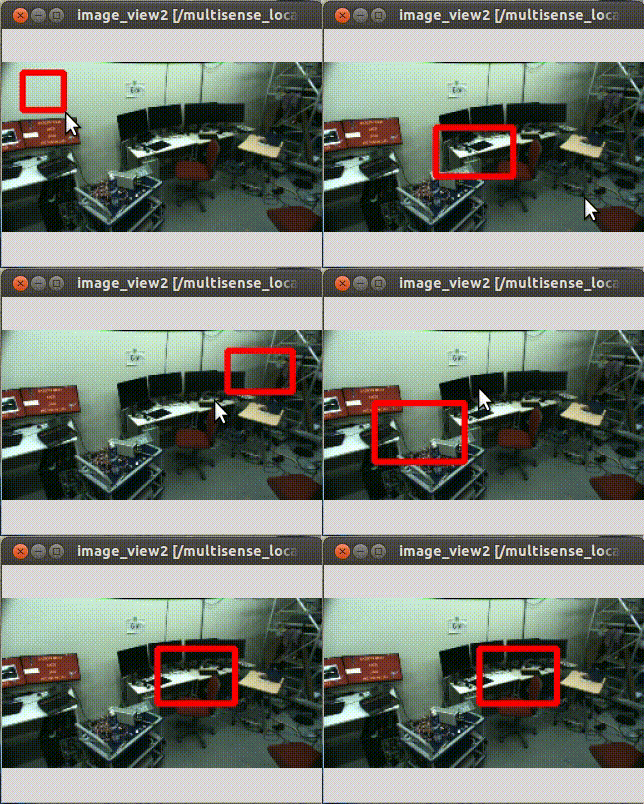
image_view2 is an extended image_view.
Features * Draw markers on image view * Interact with user direction
Interaction Modes
image_view2 support several mode to interact with user.
You can set interaction mode by ~interaction_mode parameter or
change mode by service interfaces.
- Rectangle mode (
~interaction_mode:=rectangle)
In rectangle mode, user can select region-of-interest by dragging mouse pointer.
Selected regions are published to
image/screenrectangle (geometry_msgs/PolygonStamped) topic.
If user clicks on the view instead of dragging pointer, clicked position
is published to image/screenpoint (geometry_msgs/PointStamped) topic.
- Line mode (
~interaction_mode:=line)
In line mode, user can select a line by dragging mouse pointer.
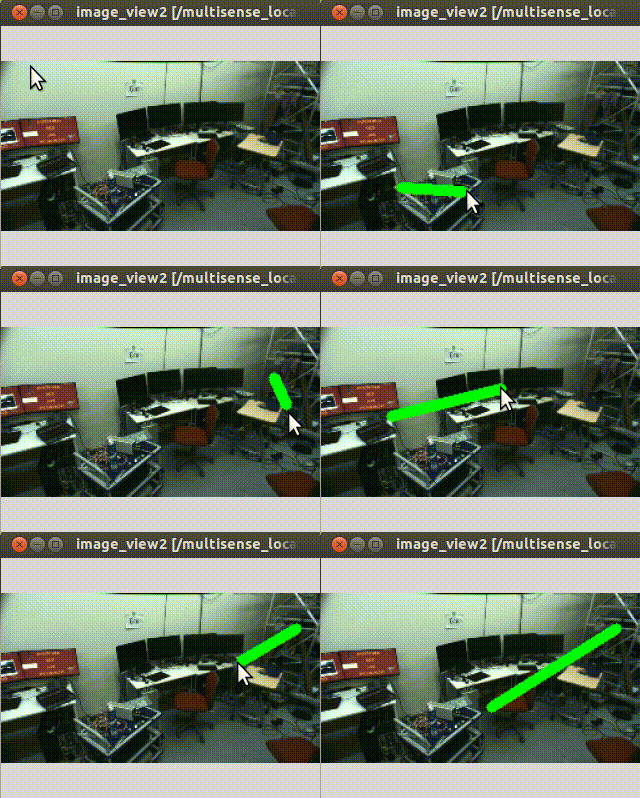
Selected line are published to image/line (geometry_msgs/PolygonStamped) topic.
- Polygon mode (
~interaction_mode:=poly)
In polygon mode, user can select a series of closed lines. User can add line by left-click and close the lines by right-click.
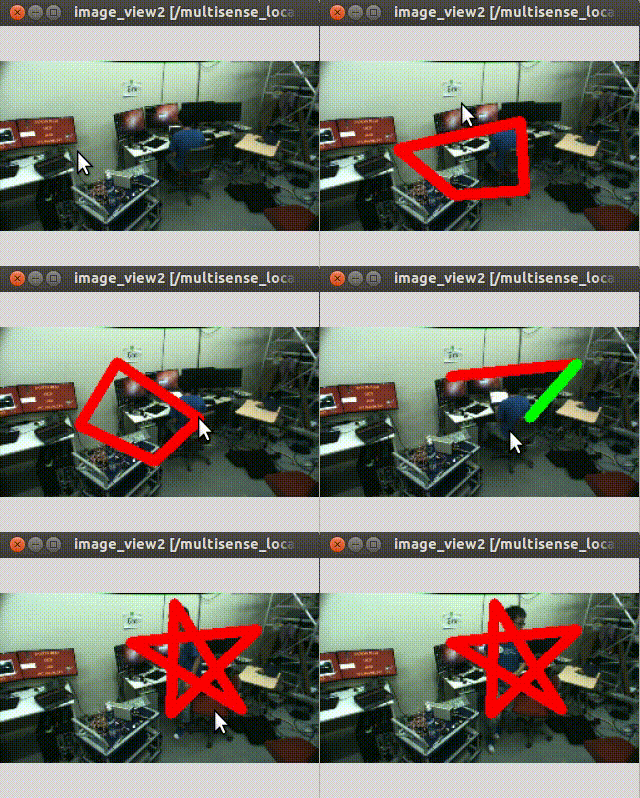
Selected polygon are published to image/poly (geometry_msgs/PolygonStamped) topic.
- Grabcut mode (
~interaction_mode:=grabcut)
In grabcut mode, user can select two curves. By typing Esc key, you can clear
selected curves.
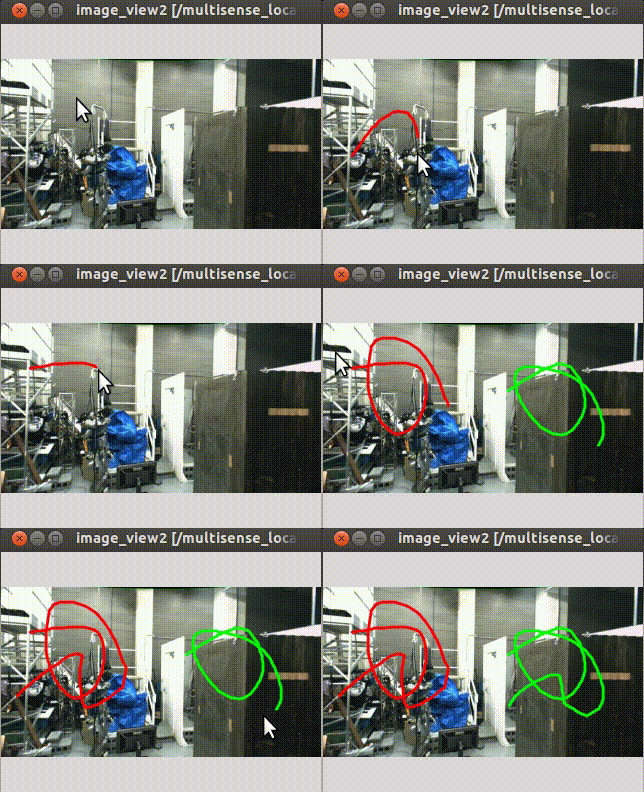
The selected first red curve is published to
image/foreground (sensor_msgs/Image) and
the second green one is publiehd to image/background (sensor_msgs/Image).
This mode is originally implemented to select forground and background pixels for grabcut.
* Grabcut Rectangle mode (~interaction_mode:=grabcut_rect)
In grabcut rectangle mode, user can select two rectangles. By typing Esc key, you can clear
selected rectangles.
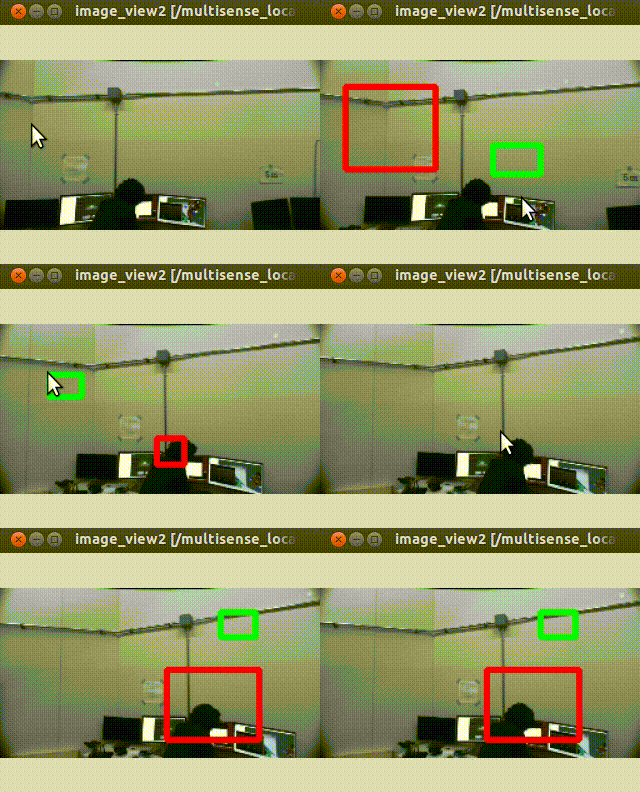
The selected first red rectangle is published to
image/foreground_rect (geometry_msgs/PolygonStamped) and
the second green one is publiehd to
image/background_rect (geometry_msgs/PolygonStamped).
This mode is originally implemented to select forground and background regions for grabcut.
ROS API
Publising Topics
-
image/marked(sensor_msgs/Image)
Image with marks drawed.
-
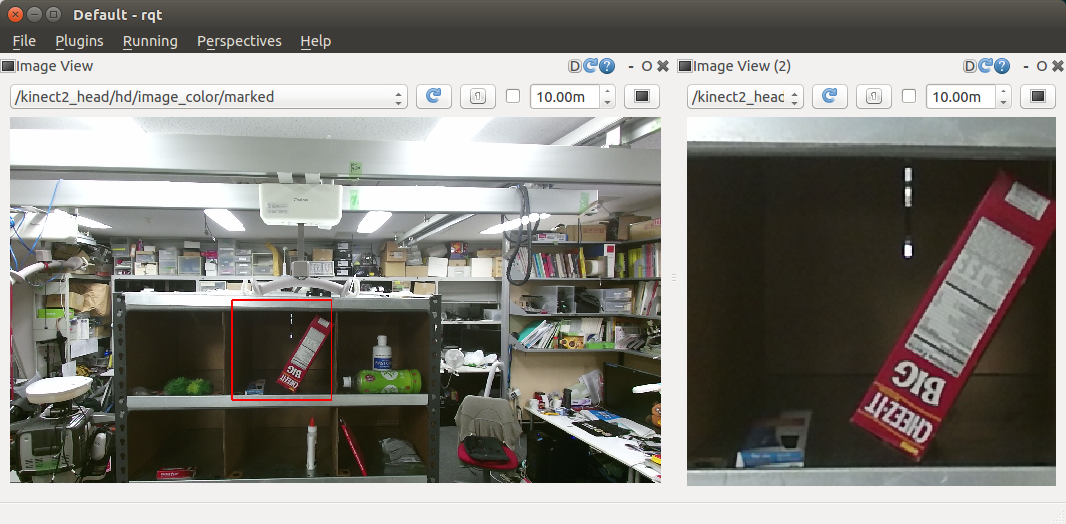
image/screenrectangle_image(sensor_msgs/Image)
Cropped image with user selection at Rectangle mode.
Subscribing Topics
-
image(sensor_msgs/Image)
Input image
* camera_info (sensor_msgs/CameraInfo)
CameraInfo of the image. camera info is required to compute projection matrix
when drawing markers.
* image_marker (image_view2/ImageMarker2)
Marker topic.
* image/event (image_view2/MouseEvent)
Event interface. image_view2 can handle mouse events without gui interaction. This topic is used to emulate event handling via ros topics
Advertising Services
-
~change_mode(image_view2/ChangeMode)
Service interface to change interaction mode.
* ~rectangle_mode (std_srvs/Empty)
* ~grabcut_mode (std_srvs/Empty)
* ~grabcut_rect_mode (std_srvs/Empty)
* ~line_mode (std_srvs/Empty)
* ~poly_mode (std_srvs/Empty)
* ~none_mode (std_srvs/Empty)
Service interface to change interaction mode with std_srvs/Empty service.
image_view2/ImageMarker2
image_view2/ImageMarker2 is a message to draw on image_view2 canvas.
Definition is:
byte CIRCLE=0
byte LINE_STRIP=1
byte LINE_LIST=2
byte POLYGON=3
byte POINTS=4
byte FRAMES=5
byte TEXT=6
byte LINE_STRIP3D=7
byte LINE_LIST3D=8
byte POLYGON3D=9
byte POINTS3D=10
byte TEXT3D=11
byte CIRCLE3D=12
byte ADD=0
byte REMOVE=1
std_msgs/Header header
  uint32 seq
  time stamp
  string frame_id
string ns
int32 id
int32 type
int32 action
geometry_msgs/Point position
  float64 x
  float64 y
  float64 z
geometry_msgs/PointStamped position3D
  std_msgs/Header header
    uint32 seq
    time stamp
    string frame_id
  geometry_msgs/Point point
    float64 x
    float64 y
    float64 z
geometry_msgs/PoseStamped pose
  std_msgs/Header header
    uint32 seq
    time stamp
    string frame_id
  geometry_msgs/Pose pose
    geometry_msgs/Point position
      float64 x
      float64 y
      float64 z
    geometry_msgs/Quaternion orientation
      float64 x
      float64 y
      float64 z
      float64 w
float32 scale
float32 width
std_msgs/ColorRGBA outline_color
  float32 r
  float32 g
  float32 b
  float32 a
byte filled
std_msgs/ColorRGBA fill_color
  float32 r
  float32 g
  float32 b
  float32 a
duration lifetime
byte arc
float32 angle
geometry_msgs/Point[] points
  float64 x
  float64 y
  float64 z
image_view2/PointArrayStamped points3D
  std_msgs/Header header
    uint32 seq
    time stamp
    string frame_id
  geometry_msgs/Point[] points
    float64 x
    float64 y
    float64 z
std_msgs/ColorRGBA[] outline_colors
  float32 r
  float32 g
  float32 b
  float32 a
string[] frames
string text
bool left_up_origin
bool ratio_scale
Could not convert RST to MD: No such file or directory - pandoc
Wiki Tutorials
Source Tutorials
Package Dependencies
System Dependencies
| Name |
|---|
| python-numpy |
| python-scipy |
Dependant Packages
Launch files
Services
Plugins
Recent questions tagged image_view2 at answers.ros.org
|
|
image_view2 package from jsk_common repojsk_common dynamic_tf_publisher jsk_data jsk_network_tools image_view2 multi_map_server jsk_tilt_laser jsk_tools jsk_topic_tools virtual_force_publisher |
Package Summary
| Tags | No category tags. |
| Version | 2.2.10 |
| License | BSD |
| Build type | CATKIN |
| Use | RECOMMENDED |
Repository Summary
| Checkout URI | https://github.com/jsk-ros-pkg/jsk_common.git |
| VCS Type | git |
| VCS Version | master |
| Last Updated | 2019-05-22 |
| Dev Status | DEVELOPED |
| Released | RELEASED |
Package Description
Additional Links
Maintainers
- Kei Okada
Authors
- Kei Okada
image_view2
image_view2 is an extended image_view.
Features * Draw markers on image view * Interact with user direction
Interaction Modes
image_view2 support several mode to interact with user.
You can set interaction mode by ~interaction_mode parameter or
change mode by service interfaces.
- Rectangle mode (
~interaction_mode:=rectangle)
In rectangle mode, user can select region-of-interest by dragging mouse pointer.
Selected regions are published to
image/screenrectangle (geometry_msgs/PolygonStamped) topic.
If user clicks on the view instead of dragging pointer, clicked position
is published to image/screenpoint (geometry_msgs/PointStamped) topic.
- Line mode (
~interaction_mode:=line)
In line mode, user can select a line by dragging mouse pointer.
Selected line are published to image/line (geometry_msgs/PolygonStamped) topic.
- Polygon mode (
~interaction_mode:=poly)
In polygon mode, user can select a series of closed lines. User can add line by left-click and close the lines by right-click.
Selected polygon are published to image/poly (geometry_msgs/PolygonStamped) topic.
- Grabcut mode (
~interaction_mode:=grabcut)
In grabcut mode, user can select two curves. By typing Esc key, you can clear
selected curves.
The selected first red curve is published to
image/foreground (sensor_msgs/Image) and
the second green one is publiehd to image/background (sensor_msgs/Image).
This mode is originally implemented to select forground and background pixels for grabcut.
* Grabcut Rectangle mode (~interaction_mode:=grabcut_rect)
In grabcut rectangle mode, user can select two rectangles. By typing Esc key, you can clear
selected rectangles.
The selected first red rectangle is published to
image/foreground_rect (geometry_msgs/PolygonStamped) and
the second green one is publiehd to
image/background_rect (geometry_msgs/PolygonStamped).
This mode is originally implemented to select forground and background regions for grabcut.
ROS API
Publising Topics
-
image/marked(sensor_msgs/Image)
Image with marks drawed.
-
image/screenrectangle_image(sensor_msgs/Image)
Cropped image with user selection at Rectangle mode.
Subscribing Topics
-
image(sensor_msgs/Image)
Input image
* camera_info (sensor_msgs/CameraInfo)
CameraInfo of the image. camera info is required to compute projection matrix
when drawing markers.
* image_marker (image_view2/ImageMarker2)
Marker topic.
* image/event (image_view2/MouseEvent)
Event interface. image_view2 can handle mouse events without gui interaction. This topic is used to emulate event handling via ros topics
Advertising Services
-
~change_mode(image_view2/ChangeMode)
Service interface to change interaction mode.
* ~rectangle_mode (std_srvs/Empty)
* ~grabcut_mode (std_srvs/Empty)
* ~grabcut_rect_mode (std_srvs/Empty)
* ~line_mode (std_srvs/Empty)
* ~poly_mode (std_srvs/Empty)
* ~none_mode (std_srvs/Empty)
Service interface to change interaction mode with std_srvs/Empty service.
image_view2/ImageMarker2
image_view2/ImageMarker2 is a message to draw on image_view2 canvas.
Definition is:
byte CIRCLE=0
byte LINE_STRIP=1
byte LINE_LIST=2
byte POLYGON=3
byte POINTS=4
byte FRAMES=5
byte TEXT=6
byte LINE_STRIP3D=7
byte LINE_LIST3D=8
byte POLYGON3D=9
byte POINTS3D=10
byte TEXT3D=11
byte CIRCLE3D=12
byte ADD=0
byte REMOVE=1
std_msgs/Header header
  uint32 seq
  time stamp
  string frame_id
string ns
int32 id
int32 type
int32 action
geometry_msgs/Point position
  float64 x
  float64 y
  float64 z
geometry_msgs/PointStamped position3D
  std_msgs/Header header
    uint32 seq
    time stamp
    string frame_id
  geometry_msgs/Point point
    float64 x
    float64 y
    float64 z
geometry_msgs/PoseStamped pose
  std_msgs/Header header
    uint32 seq
    time stamp
    string frame_id
  geometry_msgs/Pose pose
    geometry_msgs/Point position
      float64 x
      float64 y
      float64 z
    geometry_msgs/Quaternion orientation
      float64 x
      float64 y
      float64 z
      float64 w
float32 scale
float32 width
std_msgs/ColorRGBA outline_color
  float32 r
  float32 g
  float32 b
  float32 a
byte filled
std_msgs/ColorRGBA fill_color
  float32 r
  float32 g
  float32 b
  float32 a
duration lifetime
byte arc
float32 angle
geometry_msgs/Point[] points
  float64 x
  float64 y
  float64 z
image_view2/PointArrayStamped points3D
  std_msgs/Header header
    uint32 seq
    time stamp
    string frame_id
  geometry_msgs/Point[] points
    float64 x
    float64 y
    float64 z
std_msgs/ColorRGBA[] outline_colors
  float32 r
  float32 g
  float32 b
  float32 a
string[] frames
string text
bool left_up_origin
bool ratio_scale
Could not convert RST to MD: No such file or directory - pandoc
Wiki Tutorials
Source Tutorials
Package Dependencies
System Dependencies
| Name |
|---|
| python-numpy |
| python-scipy |
Dependant Packages
Launch files
Services
Plugins
Recent questions tagged image_view2 at answers.ros.org
|
|
image_view2 package from jsk_common repojsk_common dynamic_tf_publisher jsk_data jsk_network_tools image_view2 multi_map_server jsk_tilt_laser jsk_tools jsk_topic_tools virtual_force_publisher |
Package Summary
| Tags | No category tags. |
| Version | 2.2.10 |
| License | BSD |
| Build type | CATKIN |
| Use | RECOMMENDED |
Repository Summary
| Checkout URI | https://github.com/jsk-ros-pkg/jsk_common.git |
| VCS Type | git |
| VCS Version | master |
| Last Updated | 2019-05-22 |
| Dev Status | DEVELOPED |
| Released | RELEASED |
Package Description
Additional Links
Maintainers
- Kei Okada
Authors
- Kei Okada
image_view2
image_view2 is an extended image_view.
Features * Draw markers on image view * Interact with user direction
Interaction Modes
image_view2 support several mode to interact with user.
You can set interaction mode by ~interaction_mode parameter or
change mode by service interfaces.
- Rectangle mode (
~interaction_mode:=rectangle)
In rectangle mode, user can select region-of-interest by dragging mouse pointer.
Selected regions are published to
image/screenrectangle (geometry_msgs/PolygonStamped) topic.
If user clicks on the view instead of dragging pointer, clicked position
is published to image/screenpoint (geometry_msgs/PointStamped) topic.
- Line mode (
~interaction_mode:=line)
In line mode, user can select a line by dragging mouse pointer.
Selected line are published to image/line (geometry_msgs/PolygonStamped) topic.
- Polygon mode (
~interaction_mode:=poly)
In polygon mode, user can select a series of closed lines. User can add line by left-click and close the lines by right-click.
Selected polygon are published to image/poly (geometry_msgs/PolygonStamped) topic.
- Grabcut mode (
~interaction_mode:=grabcut)
In grabcut mode, user can select two curves. By typing Esc key, you can clear
selected curves.
The selected first red curve is published to
image/foreground (sensor_msgs/Image) and
the second green one is publiehd to image/background (sensor_msgs/Image).
This mode is originally implemented to select forground and background pixels for grabcut.
* Grabcut Rectangle mode (~interaction_mode:=grabcut_rect)
In grabcut rectangle mode, user can select two rectangles. By typing Esc key, you can clear
selected rectangles.
The selected first red rectangle is published to
image/foreground_rect (geometry_msgs/PolygonStamped) and
the second green one is publiehd to
image/background_rect (geometry_msgs/PolygonStamped).
This mode is originally implemented to select forground and background regions for grabcut.
ROS API
Publising Topics
-
image/marked(sensor_msgs/Image)
Image with marks drawed.
-
image/screenrectangle_image(sensor_msgs/Image)
Cropped image with user selection at Rectangle mode.
Subscribing Topics
-
image(sensor_msgs/Image)
Input image
* camera_info (sensor_msgs/CameraInfo)
CameraInfo of the image. camera info is required to compute projection matrix
when drawing markers.
* image_marker (image_view2/ImageMarker2)
Marker topic.
* image/event (image_view2/MouseEvent)
Event interface. image_view2 can handle mouse events without gui interaction. This topic is used to emulate event handling via ros topics
Advertising Services
-
~change_mode(image_view2/ChangeMode)
Service interface to change interaction mode.
* ~rectangle_mode (std_srvs/Empty)
* ~grabcut_mode (std_srvs/Empty)
* ~grabcut_rect_mode (std_srvs/Empty)
* ~line_mode (std_srvs/Empty)
* ~poly_mode (std_srvs/Empty)
* ~none_mode (std_srvs/Empty)
Service interface to change interaction mode with std_srvs/Empty service.
image_view2/ImageMarker2
image_view2/ImageMarker2 is a message to draw on image_view2 canvas.
Definition is:
byte CIRCLE=0
byte LINE_STRIP=1
byte LINE_LIST=2
byte POLYGON=3
byte POINTS=4
byte FRAMES=5
byte TEXT=6
byte LINE_STRIP3D=7
byte LINE_LIST3D=8
byte POLYGON3D=9
byte POINTS3D=10
byte TEXT3D=11
byte CIRCLE3D=12
byte ADD=0
byte REMOVE=1
std_msgs/Header header
  uint32 seq
  time stamp
  string frame_id
string ns
int32 id
int32 type
int32 action
geometry_msgs/Point position
  float64 x
  float64 y
  float64 z
geometry_msgs/PointStamped position3D
  std_msgs/Header header
    uint32 seq
    time stamp
    string frame_id
  geometry_msgs/Point point
    float64 x
    float64 y
    float64 z
geometry_msgs/PoseStamped pose
  std_msgs/Header header
    uint32 seq
    time stamp
    string frame_id
  geometry_msgs/Pose pose
    geometry_msgs/Point position
      float64 x
      float64 y
      float64 z
    geometry_msgs/Quaternion orientation
      float64 x
      float64 y
      float64 z
      float64 w
float32 scale
float32 width
std_msgs/ColorRGBA outline_color
  float32 r
  float32 g
  float32 b
  float32 a
byte filled
std_msgs/ColorRGBA fill_color
  float32 r
  float32 g
  float32 b
  float32 a
duration lifetime
byte arc
float32 angle
geometry_msgs/Point[] points
  float64 x
  float64 y
  float64 z
image_view2/PointArrayStamped points3D
  std_msgs/Header header
    uint32 seq
    time stamp
    string frame_id
  geometry_msgs/Point[] points
    float64 x
    float64 y
    float64 z
std_msgs/ColorRGBA[] outline_colors
  float32 r
  float32 g
  float32 b
  float32 a
string[] frames
string text
bool left_up_origin
bool ratio_scale
Could not convert RST to MD: No such file or directory - pandoc
Wiki Tutorials
Source Tutorials
Package Dependencies
System Dependencies
| Name |
|---|
| python-numpy |
| python-scipy |
Dependant Packages
Launch files
Services
Plugins
Recent questions tagged image_view2 at answers.ros.org
|
|
image_view2 package from jsk_common repojsk_common dynamic_tf_publisher jsk_data jsk_network_tools image_view2 multi_map_server jsk_tilt_laser jsk_tools jsk_topic_tools virtual_force_publisher |
Package Summary
| Tags | No category tags. |
| Version | 2.2.10 |
| License | BSD |
| Build type | CATKIN |
| Use | RECOMMENDED |
Repository Summary
| Checkout URI | https://github.com/jsk-ros-pkg/jsk_common.git |
| VCS Type | git |
| VCS Version | master |
| Last Updated | 2019-05-22 |
| Dev Status | DEVELOPED |
| Released | RELEASED |
Package Description
Additional Links
Maintainers
- Kei Okada
Authors
- Kei Okada
image_view2
image_view2 is an extended image_view.
Features * Draw markers on image view * Interact with user direction
Interaction Modes
image_view2 support several mode to interact with user.
You can set interaction mode by ~interaction_mode parameter or
change mode by service interfaces.
- Rectangle mode (
~interaction_mode:=rectangle)
In rectangle mode, user can select region-of-interest by dragging mouse pointer.
Selected regions are published to
image/screenrectangle (geometry_msgs/PolygonStamped) topic.
If user clicks on the view instead of dragging pointer, clicked position
is published to image/screenpoint (geometry_msgs/PointStamped) topic.
- Line mode (
~interaction_mode:=line)
In line mode, user can select a line by dragging mouse pointer.
Selected line are published to image/line (geometry_msgs/PolygonStamped) topic.
- Polygon mode (
~interaction_mode:=poly)
In polygon mode, user can select a series of closed lines. User can add line by left-click and close the lines by right-click.
Selected polygon are published to image/poly (geometry_msgs/PolygonStamped) topic.
- Grabcut mode (
~interaction_mode:=grabcut)
In grabcut mode, user can select two curves. By typing Esc key, you can clear
selected curves.
The selected first red curve is published to
image/foreground (sensor_msgs/Image) and
the second green one is publiehd to image/background (sensor_msgs/Image).
This mode is originally implemented to select forground and background pixels for grabcut.
* Grabcut Rectangle mode (~interaction_mode:=grabcut_rect)
In grabcut rectangle mode, user can select two rectangles. By typing Esc key, you can clear
selected rectangles.
The selected first red rectangle is published to
image/foreground_rect (geometry_msgs/PolygonStamped) and
the second green one is publiehd to
image/background_rect (geometry_msgs/PolygonStamped).
This mode is originally implemented to select forground and background regions for grabcut.
ROS API
Publising Topics
-
image/marked(sensor_msgs/Image)
Image with marks drawed.
-
image/screenrectangle_image(sensor_msgs/Image)
Cropped image with user selection at Rectangle mode.
Subscribing Topics
-
image(sensor_msgs/Image)
Input image
* camera_info (sensor_msgs/CameraInfo)
CameraInfo of the image. camera info is required to compute projection matrix
when drawing markers.
* image_marker (image_view2/ImageMarker2)
Marker topic.
* image/event (image_view2/MouseEvent)
Event interface. image_view2 can handle mouse events without gui interaction. This topic is used to emulate event handling via ros topics
Advertising Services
-
~change_mode(image_view2/ChangeMode)
Service interface to change interaction mode.
* ~rectangle_mode (std_srvs/Empty)
* ~grabcut_mode (std_srvs/Empty)
* ~grabcut_rect_mode (std_srvs/Empty)
* ~line_mode (std_srvs/Empty)
* ~poly_mode (std_srvs/Empty)
* ~none_mode (std_srvs/Empty)
Service interface to change interaction mode with std_srvs/Empty service.
image_view2/ImageMarker2
image_view2/ImageMarker2 is a message to draw on image_view2 canvas.
Definition is:
byte CIRCLE=0
byte LINE_STRIP=1
byte LINE_LIST=2
byte POLYGON=3
byte POINTS=4
byte FRAMES=5
byte TEXT=6
byte LINE_STRIP3D=7
byte LINE_LIST3D=8
byte POLYGON3D=9
byte POINTS3D=10
byte TEXT3D=11
byte CIRCLE3D=12
byte ADD=0
byte REMOVE=1
std_msgs/Header header
  uint32 seq
  time stamp
  string frame_id
string ns
int32 id
int32 type
int32 action
geometry_msgs/Point position
  float64 x
  float64 y
  float64 z
geometry_msgs/PointStamped position3D
  std_msgs/Header header
    uint32 seq
    time stamp
    string frame_id
  geometry_msgs/Point point
    float64 x
    float64 y
    float64 z
geometry_msgs/PoseStamped pose
  std_msgs/Header header
    uint32 seq
    time stamp
    string frame_id
  geometry_msgs/Pose pose
    geometry_msgs/Point position
      float64 x
      float64 y
      float64 z
    geometry_msgs/Quaternion orientation
      float64 x
      float64 y
      float64 z
      float64 w
float32 scale
float32 width
std_msgs/ColorRGBA outline_color
  float32 r
  float32 g
  float32 b
  float32 a
byte filled
std_msgs/ColorRGBA fill_color
  float32 r
  float32 g
  float32 b
  float32 a
duration lifetime
byte arc
float32 angle
geometry_msgs/Point[] points
  float64 x
  float64 y
  float64 z
image_view2/PointArrayStamped points3D
  std_msgs/Header header
    uint32 seq
    time stamp
    string frame_id
  geometry_msgs/Point[] points
    float64 x
    float64 y
    float64 z
std_msgs/ColorRGBA[] outline_colors
  float32 r
  float32 g
  float32 b
  float32 a
string[] frames
string text
bool left_up_origin
bool ratio_scale
Could not convert RST to MD: No such file or directory - pandoc
Wiki Tutorials
Source Tutorials
Package Dependencies
System Dependencies
| Name |
|---|
| python-numpy |
| python-scipy |
Dependant Packages
Launch files
Services
Plugins
Recent questions tagged image_view2 at answers.ros.org
|
|
image_view2 package from jsk_common repojsk_common dynamic_tf_publisher jsk_data jsk_network_tools image_view2 multi_map_server jsk_tilt_laser jsk_tools jsk_topic_tools virtual_force_publisher |
Package Summary
| Tags | No category tags. |
| Version | 2.2.10 |
| License | BSD |
| Build type | CATKIN |
| Use | RECOMMENDED |
Repository Summary
| Checkout URI | https://github.com/jsk-ros-pkg/jsk_common.git |
| VCS Type | git |
| VCS Version | master |
| Last Updated | 2019-05-22 |
| Dev Status | DEVELOPED |
| Released | RELEASED |
Package Description
Additional Links
Maintainers
- Kei Okada
Authors
- Kei Okada
image_view2
image_view2 is an extended image_view.
Features * Draw markers on image view * Interact with user direction
Interaction Modes
image_view2 support several mode to interact with user.
You can set interaction mode by ~interaction_mode parameter or
change mode by service interfaces.
- Rectangle mode (
~interaction_mode:=rectangle)
In rectangle mode, user can select region-of-interest by dragging mouse pointer.
Selected regions are published to
image/screenrectangle (geometry_msgs/PolygonStamped) topic.
If user clicks on the view instead of dragging pointer, clicked position
is published to image/screenpoint (geometry_msgs/PointStamped) topic.
- Line mode (
~interaction_mode:=line)
In line mode, user can select a line by dragging mouse pointer.
Selected line are published to image/line (geometry_msgs/PolygonStamped) topic.
- Polygon mode (
~interaction_mode:=poly)
In polygon mode, user can select a series of closed lines. User can add line by left-click and close the lines by right-click.
Selected polygon are published to image/poly (geometry_msgs/PolygonStamped) topic.
- Grabcut mode (
~interaction_mode:=grabcut)
In grabcut mode, user can select two curves. By typing Esc key, you can clear
selected curves.
The selected first red curve is published to
image/foreground (sensor_msgs/Image) and
the second green one is publiehd to image/background (sensor_msgs/Image).
This mode is originally implemented to select forground and background pixels for grabcut.
* Grabcut Rectangle mode (~interaction_mode:=grabcut_rect)
In grabcut rectangle mode, user can select two rectangles. By typing Esc key, you can clear
selected rectangles.
The selected first red rectangle is published to
image/foreground_rect (geometry_msgs/PolygonStamped) and
the second green one is publiehd to
image/background_rect (geometry_msgs/PolygonStamped).
This mode is originally implemented to select forground and background regions for grabcut.
ROS API
Publising Topics
-
image/marked(sensor_msgs/Image)
Image with marks drawed.
-
image/screenrectangle_image(sensor_msgs/Image)
Cropped image with user selection at Rectangle mode.
Subscribing Topics
-
image(sensor_msgs/Image)
Input image
* camera_info (sensor_msgs/CameraInfo)
CameraInfo of the image. camera info is required to compute projection matrix
when drawing markers.
* image_marker (image_view2/ImageMarker2)
Marker topic.
* image/event (image_view2/MouseEvent)
Event interface. image_view2 can handle mouse events without gui interaction. This topic is used to emulate event handling via ros topics
Advertising Services
-
~change_mode(image_view2/ChangeMode)
Service interface to change interaction mode.
* ~rectangle_mode (std_srvs/Empty)
* ~grabcut_mode (std_srvs/Empty)
* ~grabcut_rect_mode (std_srvs/Empty)
* ~line_mode (std_srvs/Empty)
* ~poly_mode (std_srvs/Empty)
* ~none_mode (std_srvs/Empty)
Service interface to change interaction mode with std_srvs/Empty service.
image_view2/ImageMarker2
image_view2/ImageMarker2 is a message to draw on image_view2 canvas.
Definition is:
byte CIRCLE=0
byte LINE_STRIP=1
byte LINE_LIST=2
byte POLYGON=3
byte POINTS=4
byte FRAMES=5
byte TEXT=6
byte LINE_STRIP3D=7
byte LINE_LIST3D=8
byte POLYGON3D=9
byte POINTS3D=10
byte TEXT3D=11
byte CIRCLE3D=12
byte ADD=0
byte REMOVE=1
std_msgs/Header header
  uint32 seq
  time stamp
  string frame_id
string ns
int32 id
int32 type
int32 action
geometry_msgs/Point position
  float64 x
  float64 y
  float64 z
geometry_msgs/PointStamped position3D
  std_msgs/Header header
    uint32 seq
    time stamp
    string frame_id
  geometry_msgs/Point point
    float64 x
    float64 y
    float64 z
geometry_msgs/PoseStamped pose
  std_msgs/Header header
    uint32 seq
    time stamp
    string frame_id
  geometry_msgs/Pose pose
    geometry_msgs/Point position
      float64 x
      float64 y
      float64 z
    geometry_msgs/Quaternion orientation
      float64 x
      float64 y
      float64 z
      float64 w
float32 scale
float32 width
std_msgs/ColorRGBA outline_color
  float32 r
  float32 g
  float32 b
  float32 a
byte filled
std_msgs/ColorRGBA fill_color
  float32 r
  float32 g
  float32 b
  float32 a
duration lifetime
byte arc
float32 angle
geometry_msgs/Point[] points
  float64 x
  float64 y
  float64 z
image_view2/PointArrayStamped points3D
  std_msgs/Header header
    uint32 seq
    time stamp
    string frame_id
  geometry_msgs/Point[] points
    float64 x
    float64 y
    float64 z
std_msgs/ColorRGBA[] outline_colors
  float32 r
  float32 g
  float32 b
  float32 a
string[] frames
string text
bool left_up_origin
bool ratio_scale
Could not convert RST to MD: No such file or directory - pandoc
Wiki Tutorials
Source Tutorials
Package Dependencies
System Dependencies
| Name |
|---|
| python-numpy |
| python-scipy |