
Package Summary
| Tags | No category tags. |
| Version | 1.1.0 |
| License | BSD |
| Build type | CATKIN |
| Use | RECOMMENDED |
Repository Summary
| Checkout URI | https://github.com/jsk-ros-pkg/jsk_robot.git |
| VCS Type | git |
| VCS Version | master |
| Last Updated | 2019-05-23 |
| Dev Status | DEVELOPED |
| Released | RELEASED |
Package Description
Additional Links
Maintainers
- Kei Okada
Authors
peppereus
This is a NAO-specific package for roseus interface.
How to make pepper model on euslisp
Install pepper mesh files with manual approval of license
sudo apt-get install ros-<ros version>-pepper-meshes
catkin build
Control Pepper via roseus
(load "package://peppereus/pepper-interface.l") ;; load modules
(setq *pepper* (pepper))          ;; creat a robot model
(setq *ri* (instance pepper-interface :init)) ;; make connection to the real robot
(objects (list *pepper*))        ;; display the robot model
or
(load "package://peppereus/pepper-interface.l") ;; load modules
(pepper-init)
How to try methods
-
roslaunch jsk_pepper_startup.launch
- Please refer to Control Pepper via roseus.
- Please try methods, you can refer to the explanations below how to try them. If there is a sign of
kochigami-develop, please follow Interface when controlling NAO and Pepper via roseus.
Methods
Tablet
By using tablet-related methods, we can show image, app, html file and web page on the tablet.
:get-show-image-folder-path (naoqi_bridge [
kochigami-develop]):set-show-image-folder-path
name(naoqi_bridge [kochigami-develop])
Trouble Shooting
- How to log in to a robot?
ssh nao@<Your robot IP>
- How to send a file to a robot?
scp <file path of your local PC> nao@<Your robot IP>:/home/nao/.local/share/PackageManager/apps/img/html/
- If this kind of error occurs at
tablet.launch, please re-launch the program.
[ERROR] [1543212108.209135]: Exception caught:
    ALTabletService::showImage
        module destroyed
Joints of Pepper
Here is a list of joints when accessing Pepper.
ex:
(send *pepper* :reset-pose)
=> #f(2.0 -2.0 -5.0 85.0 10.0 -70.0 -20.0 -40.0 85.0 -10.0 70.0 20.0 40.0 0.0 0.0)
       0    1    2   3    4     5     6     7    8     9    10   11   12   13  14
0: :knee-p
1: :hip-r
2: :hip-p
3: :larm :shoulder-p
4: :larm :shoulder-r
5: :larm :elbow-y
6: :larm :elbow-p
7: :larm :wrist-y
8: :rarm :shoulder-p
9: :rarm :shoulder-r
10: :rarm :elbow-y
11: :rarm :elbow-p
12: :rarm :wrist-y
13: :head :neck-y
14: :head :neck-p
How to send angle vector
(send *pepper* :head :neck-y :joint-angle -10)
(send *ri* :angle-vector (send *pepper* :angle-vector)
How to send sequences of angle vector
(setq *reset-pose* #f(2.0 -2.0 -5.0 85.0 10.0 -70.0 -20.0 -40.0 85.0 -10.0 70.0 20.0 40.0 0.0 0.0))
(setq *hello-pose1* #f(2.0 -2.0 -5.0 85.0 10.0 30.0 -0.5 30.0 -20.0 -10.0 70.0 20.0 40.0 30.0 0.0))
(setq *hello-pose2* #f(2.0 -2.0 -5.0 85.0 10.0 -70.0 -20.0 -40.0 0.0 -10.0 70.0 20.0 40.0 0.0 0.0))

(setq *hello-pose-list* (list *reset-pose* *hello-pose1* *hello-pose2* *reset-pose*))
(setq *hello-time-list* (list 2000 3000 4000 5000))

(send *ri* :angle-vector-sequence *hello-pose-list* *hello-time-list*)
Default poses
They are defined in pepper.yaml.
:bowing-pose
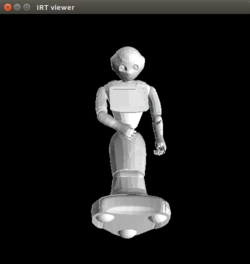
:greeting-pose
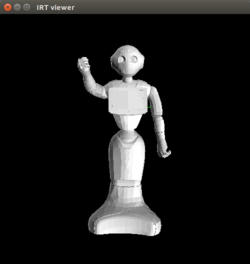
:look-foot
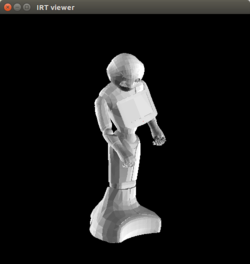
:nodding-pose
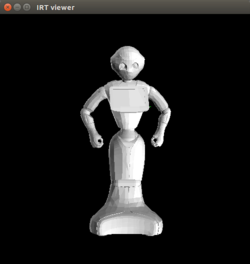
:ok-pose
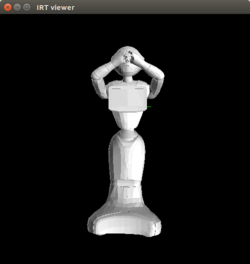
:pointing-left-pose
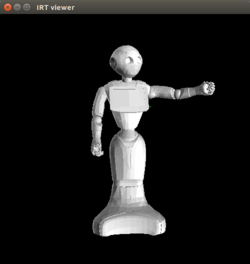
:pointing-right-pose
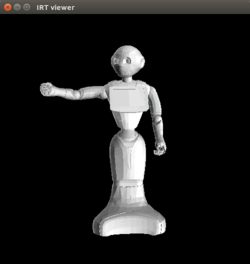
:raise-left-hand-high
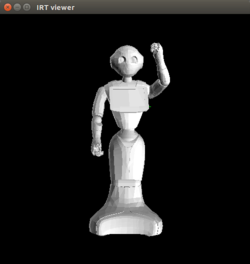
:raise-left-hand-low
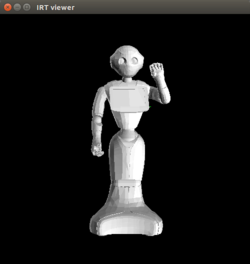
:raise-right-hand-high
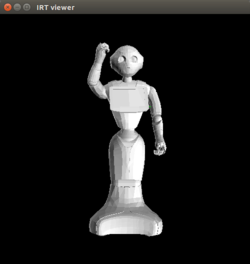
:raise-right-hand-low
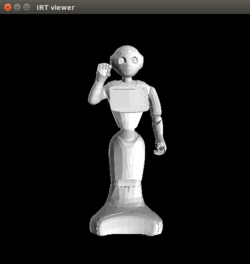
:reset-pose
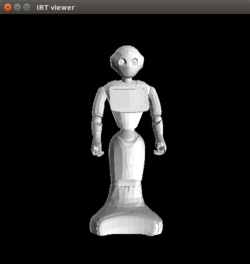
:show-bottom-camera
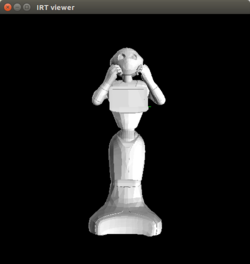
:show-head
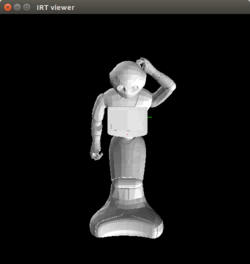
:show-top-camera
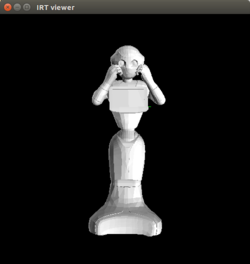
:spread-hands-smally
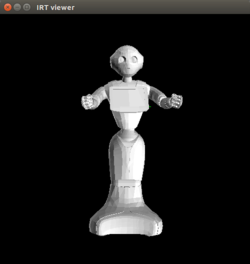
:spread-hands-widely
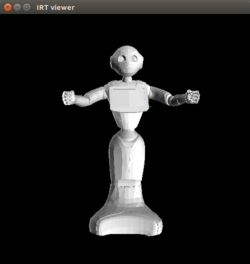
:touch-speakers
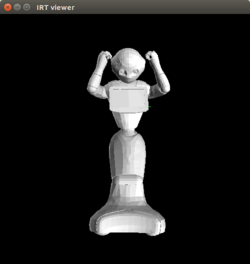
:watching-pose
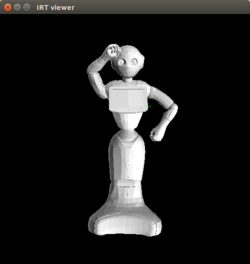
:wondering-pose
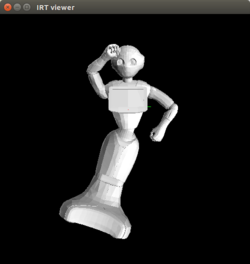
Could not convert RST to MD: No such file or directory - pandoc
Wiki Tutorials
Source Tutorials
Package Dependencies
| Deps | Name | |
|---|---|---|
| 1 | naoqieus | |
| 1 | pepper_description | |
| 2 | rostest | |
| 1 | catkin | |
| 1 | pepper_bringup |
System Dependencies
Dependant Packages
Launch files
Messages
Services
Plugins
Recent questions tagged peppereus at answers.ros.org
Package Summary
| Tags | No category tags. |
| Version | 1.1.0 |
| License | BSD |
| Build type | CATKIN |
| Use | RECOMMENDED |
Repository Summary
| Checkout URI | https://github.com/jsk-ros-pkg/jsk_robot.git |
| VCS Type | git |
| VCS Version | master |
| Last Updated | 2019-05-23 |
| Dev Status | DEVELOPED |
| Released | RELEASED |
Package Description
Additional Links
Maintainers
- Kei Okada
Authors
peppereus
This is a NAO-specific package for roseus interface.
How to make pepper model on euslisp
Install pepper mesh files with manual approval of license
sudo apt-get install ros-<ros version>-pepper-meshes
catkin build
Control Pepper via roseus
(load "package://peppereus/pepper-interface.l") ;; load modules
(setq *pepper* (pepper))          ;; creat a robot model
(setq *ri* (instance pepper-interface :init)) ;; make connection to the real robot
(objects (list *pepper*))        ;; display the robot model
or
(load "package://peppereus/pepper-interface.l") ;; load modules
(pepper-init)
How to try methods
-
roslaunch jsk_pepper_startup.launch
- Please refer to Control Pepper via roseus.
- Please try methods, you can refer to the explanations below how to try them. If there is a sign of
kochigami-develop, please follow Interface when controlling NAO and Pepper via roseus.
Methods
Tablet
By using tablet-related methods, we can show image, app, html file and web page on the tablet.
:get-show-image-folder-path (naoqi_bridge [
kochigami-develop]):set-show-image-folder-path
name(naoqi_bridge [kochigami-develop])
Trouble Shooting
- How to log in to a robot?
ssh nao@<Your robot IP>
- How to send a file to a robot?
scp <file path of your local PC> nao@<Your robot IP>:/home/nao/.local/share/PackageManager/apps/img/html/
- If this kind of error occurs at
tablet.launch, please re-launch the program.
[ERROR] [1543212108.209135]: Exception caught:
    ALTabletService::showImage
        module destroyed
Joints of Pepper
Here is a list of joints when accessing Pepper.
ex:
(send *pepper* :reset-pose)
=> #f(2.0 -2.0 -5.0 85.0 10.0 -70.0 -20.0 -40.0 85.0 -10.0 70.0 20.0 40.0 0.0 0.0)
       0    1    2   3    4     5     6     7    8     9    10   11   12   13  14
0: :knee-p
1: :hip-r
2: :hip-p
3: :larm :shoulder-p
4: :larm :shoulder-r
5: :larm :elbow-y
6: :larm :elbow-p
7: :larm :wrist-y
8: :rarm :shoulder-p
9: :rarm :shoulder-r
10: :rarm :elbow-y
11: :rarm :elbow-p
12: :rarm :wrist-y
13: :head :neck-y
14: :head :neck-p
How to send angle vector
(send *pepper* :head :neck-y :joint-angle -10)
(send *ri* :angle-vector (send *pepper* :angle-vector)
How to send sequences of angle vector
(setq *reset-pose* #f(2.0 -2.0 -5.0 85.0 10.0 -70.0 -20.0 -40.0 85.0 -10.0 70.0 20.0 40.0 0.0 0.0))
(setq *hello-pose1* #f(2.0 -2.0 -5.0 85.0 10.0 30.0 -0.5 30.0 -20.0 -10.0 70.0 20.0 40.0 30.0 0.0))
(setq *hello-pose2* #f(2.0 -2.0 -5.0 85.0 10.0 -70.0 -20.0 -40.0 0.0 -10.0 70.0 20.0 40.0 0.0 0.0))

(setq *hello-pose-list* (list *reset-pose* *hello-pose1* *hello-pose2* *reset-pose*))
(setq *hello-time-list* (list 2000 3000 4000 5000))

(send *ri* :angle-vector-sequence *hello-pose-list* *hello-time-list*)
Default poses
They are defined in pepper.yaml.
:bowing-pose
:greeting-pose
:look-foot
:nodding-pose
:ok-pose
:pointing-left-pose
:pointing-right-pose
:raise-left-hand-high
:raise-left-hand-low
:raise-right-hand-high
:raise-right-hand-low
:reset-pose
:show-bottom-camera
:show-head
:show-top-camera
:spread-hands-smally
:spread-hands-widely
:touch-speakers
:watching-pose
:wondering-pose
Could not convert RST to MD: No such file or directory - pandoc
Wiki Tutorials
Source Tutorials
Package Dependencies
| Deps | Name | |
|---|---|---|
| 1 | naoqieus | |
| 1 | pepper_description | |
| 2 | rostest | |
| 1 | catkin | |
| 1 | pepper_bringup |