
Package Summary
| Tags | No category tags. |
| Version | 1.1.0 |
| License | BSD |
| Build type | CATKIN |
| Use | RECOMMENDED |
Repository Summary
| Checkout URI | https://github.com/jsk-ros-pkg/jsk_robot.git |
| VCS Type | git |
| VCS Version | master |
| Last Updated | 2019-05-23 |
| Dev Status | DEVELOPED |
| Released | RELEASED |
Package Description
Additional Links
Maintainers
- Kei Okada
Authors
- Kei Okada
jsk_pepper_startup
What's this?
contains JSK's launch file for startup Pepper with ROS
Running startup program
rossetip
roslaunch jsk_pepper_startup jsk_pepper_startup.launch network_interface:=<your network interaface (ex. eth0, enp0s31f6...)>
% For network_interface variable, please check ifconfig for the interface name your PC uses.
% You can play audio stream from Pepper's audio ROS topic. Please see here for more details.
% In order to confirm if ROS-Pepper is booting, please check with rviz.
roscd pepper_bringup/config
rosrun rviz rviz -d pepper.rviz
Control Pepper via roseus
Please refer to README here.
Nodes, topics and services
These are a list of nodes and some useful topics and services from jsk_pepper_startup.launch.
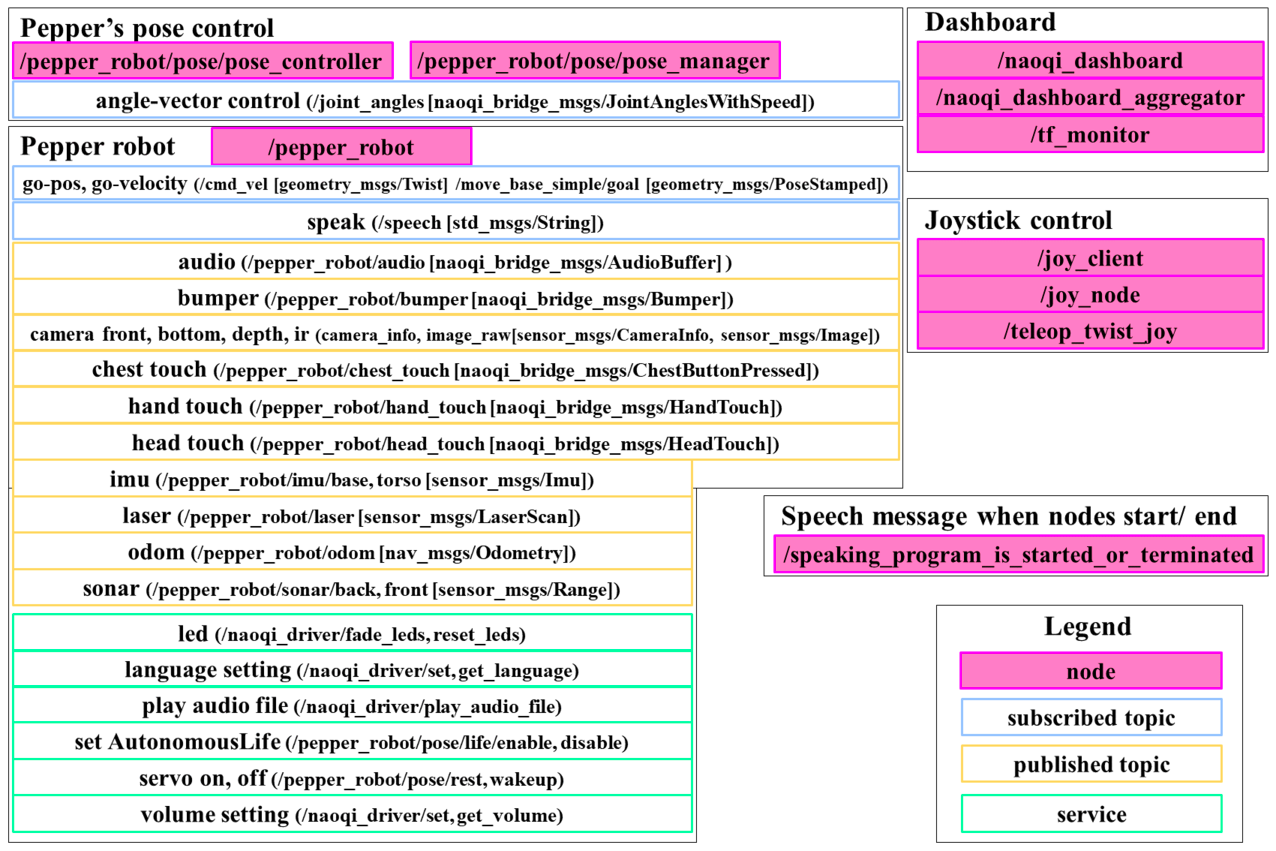
Pepper robot
Publications:
 * /joint_states [sensor_msgs/JointState]
 * /pepper_robot/audio [naoqi_bridge_msgs/AudioBuffer]
 * /pepper_robot/bumper [naoqi_bridge_msgs/Bumper]
 * /pepper_robot/camera/bottom/camera_info [sensor_msgs/CameraInfo]
 * /pepper_robot/camera/bottom/image_raw [sensor_msgs/Image]
 * /pepper_robot/camera/depth/camera_info [sensor_msgs/CameraInfo]
 * /pepper_robot/camera/depth/image_raw [sensor_msgs/Image]
 * /pepper_robot/camera/front/camera_info [sensor_msgs/CameraInfo]
 * /pepper_robot/camera/front/image_raw [sensor_msgs/Image]
 * /pepper_robot/camera/ir/camera_info [sensor_msgs/CameraInfo]
 * /pepper_robot/camera/ir/image_raw [sensor_msgs/Image]
 * /pepper_robot/chest_touch [naoqi_bridge_msgs/ChestButtonPressed]
 * /pepper_robot/hand_touch [naoqi_bridge_msgs/HandTouch]
 * /pepper_robot/head_touch [naoqi_bridge_msgs/HeadTouch]
 * /pepper_robot/imu/base [sensor_msgs/Imu]
 * /pepper_robot/imu/torso [sensor_msgs/Imu]
 * /pepper_robot/info [naoqi_bridge_msgs/StringStamped]
 * /pepper_robot/laser [sensor_msgs/LaserScan]
 * /pepper_robot/odom [nav_msgs/Odometry]
 * /pepper_robot/sonar/back [sensor_msgs/Range]
 * /pepper_robot/sonar/front [sensor_msgs/Range]
 * /tf [tf2_msgs/TFMessage]

Subscriptions:
 * /cmd_vel [geometry_msgs/Twist]
 * /joint_angles [naoqi_bridge_msgs/JointAnglesWithSpeed]
 * /move_base_simple/goal [geometry_msgs/PoseStamped]
 * /speech [std_msgs/String]

Services:
 * /naoqi_driver/fade_leds
 * /naoqi_driver/get_language
 * /naoqi_driver/get_robot_config
 * /naoqi_driver/get_volume
 * /naoqi_driver/play_audio_file
 * /naoqi_driver/reset_leds
 * /naoqi_driver/set_language
 * /naoqi_driver/set_volume
Pepper's pose control
Publications:
 * /pepper_robot/pose/get_life_state [std_msgs/String]

Action:
 * /pepper_robot/pose/joint_trajectory [naoqi_bridge_msgs/JointTrajectoryAction]

Services:
 * /pepper_robot/pose/life/disable
 * /pepper_robot/pose/life/enable
 * /pepper_robot/pose/life/get_state
 * /pepper_robot/pose/rest
 * /pepper_robot/pose/wakeup
Joystick
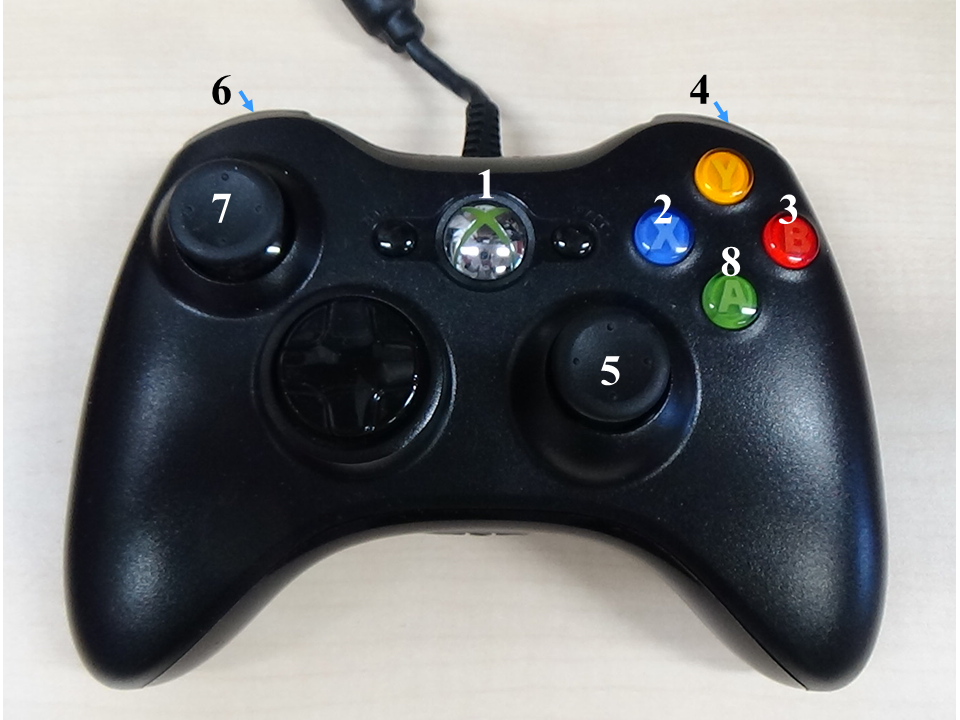
| Button | Function |
|---|---|
| 1 | Servo on/off |
| 2 | Interactive Life |
| 3 | Disable Life |
| 4+5 | Move head-p, head-y |
| 6+7 | Teleop Twist |
| 6+7+8 | Teleop Twist Turbo |
Related nodes: /joy_client, joy_node, /teleop_twist_joy
Dashboard
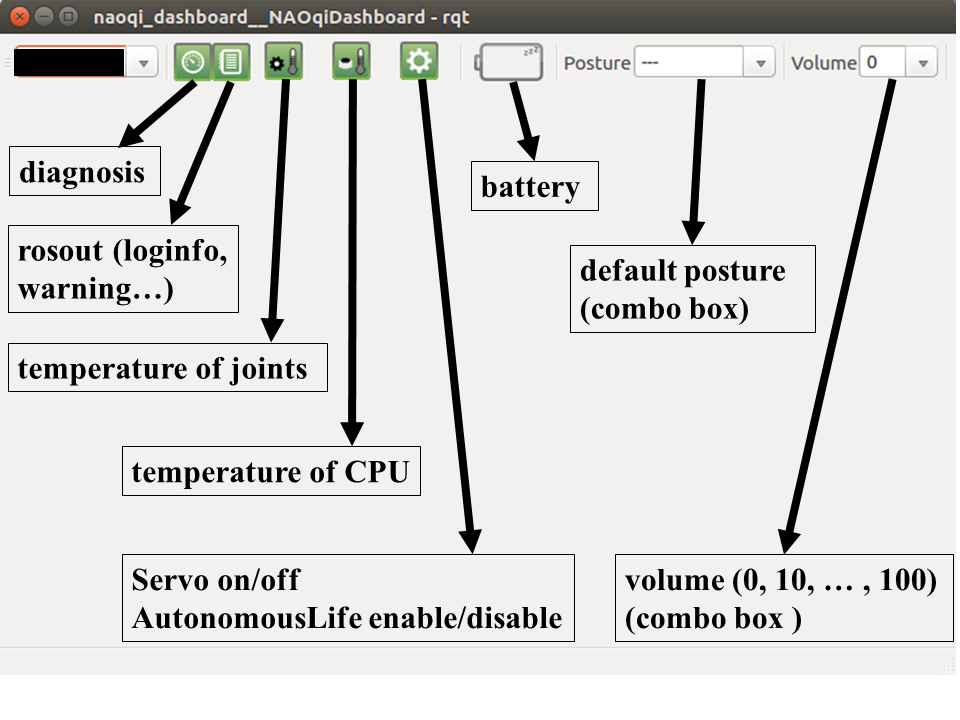
Related nodes: /naoqi_dashboard, /naoqi_dashboard_aggregator, /tf_monitor
Sample demo
roslaunch nao_apps speech.launch nao_ip:=YOUR_PEPPER_IP
roslaunch nao_interaction_launchers nao_vision_interface.launch nao_ip:=YOUR_PEPPER_IP
roslaunch nao_apps behaviors.launch nao_ip:=YOUR_PEPPER_IP
rosrun jsk_pepper_startup sample.l
$ (demo1) ;; Pepper may speak twice. (This will be fixed as soon as possible.)
If you failed in launching jsk_pepper_startup.launch
- Please try deleting all the terminals you created before, and even rebooting your PC.
If another terminal of
roscorehas been left and the connected network has changed recently, connecting your PC and pepper may fail.
- If your terminal log looks like below, please reboot pepper.
front_cameraCamera Handle is empty - cannot retrieve image
front_cameraMight be a NAOqi problem. Try to restart the ALVideoDevice.
Some tips
- If the getting started wizard appears on Pepper's tablet, it may be better to turn it off because some functions are blocked. (ref: issue 926)
Could not convert RST to MD: No such file or directory - pandoc
Wiki Tutorials
Source Tutorials
Package Dependencies
System Dependencies
Dependant Packages
Launch files
- launch/jsk_pepper_startup.launch
-
- network_interface [default: eth0]
- launch_twitter [default: false]
- launch_joy [default: true]
- launch_play_audio_stream [default: true]
- launch/play_audio_stream.launch
-
- nao_ip [default: $(optenv NAO_IP 127.0.0.1)]
- nao_port [default: $(optenv NAO_PORT 9559)]
Messages
Services
Plugins
Recent questions tagged jsk_pepper_startup at answers.ros.org
Package Summary
| Tags | No category tags. |
| Version | 1.1.0 |
| License | BSD |
| Build type | CATKIN |
| Use | RECOMMENDED |
Repository Summary
| Checkout URI | https://github.com/jsk-ros-pkg/jsk_robot.git |
| VCS Type | git |
| VCS Version | master |
| Last Updated | 2019-05-23 |
| Dev Status | DEVELOPED |
| Released | RELEASED |
Package Description
Additional Links
Maintainers
- Kei Okada
Authors
- Kei Okada
jsk_pepper_startup
What's this?
contains JSK's launch file for startup Pepper with ROS
Running startup program
rossetip
roslaunch jsk_pepper_startup jsk_pepper_startup.launch network_interface:=<your network interaface (ex. eth0, enp0s31f6...)>
% For network_interface variable, please check ifconfig for the interface name your PC uses.
% You can play audio stream from Pepper's audio ROS topic. Please see here for more details.
% In order to confirm if ROS-Pepper is booting, please check with rviz.
roscd pepper_bringup/config
rosrun rviz rviz -d pepper.rviz
Control Pepper via roseus
Please refer to README here.
Nodes, topics and services
These are a list of nodes and some useful topics and services from jsk_pepper_startup.launch.
Pepper robot
Publications:
 * /joint_states [sensor_msgs/JointState]
 * /pepper_robot/audio [naoqi_bridge_msgs/AudioBuffer]
 * /pepper_robot/bumper [naoqi_bridge_msgs/Bumper]
 * /pepper_robot/camera/bottom/camera_info [sensor_msgs/CameraInfo]
 * /pepper_robot/camera/bottom/image_raw [sensor_msgs/Image]
 * /pepper_robot/camera/depth/camera_info [sensor_msgs/CameraInfo]
 * /pepper_robot/camera/depth/image_raw [sensor_msgs/Image]
 * /pepper_robot/camera/front/camera_info [sensor_msgs/CameraInfo]
 * /pepper_robot/camera/front/image_raw [sensor_msgs/Image]
 * /pepper_robot/camera/ir/camera_info [sensor_msgs/CameraInfo]
 * /pepper_robot/camera/ir/image_raw [sensor_msgs/Image]
 * /pepper_robot/chest_touch [naoqi_bridge_msgs/ChestButtonPressed]
 * /pepper_robot/hand_touch [naoqi_bridge_msgs/HandTouch]
 * /pepper_robot/head_touch [naoqi_bridge_msgs/HeadTouch]
 * /pepper_robot/imu/base [sensor_msgs/Imu]
 * /pepper_robot/imu/torso [sensor_msgs/Imu]
 * /pepper_robot/info [naoqi_bridge_msgs/StringStamped]
 * /pepper_robot/laser [sensor_msgs/LaserScan]
 * /pepper_robot/odom [nav_msgs/Odometry]
 * /pepper_robot/sonar/back [sensor_msgs/Range]
 * /pepper_robot/sonar/front [sensor_msgs/Range]
 * /tf [tf2_msgs/TFMessage]

Subscriptions:
 * /cmd_vel [geometry_msgs/Twist]
 * /joint_angles [naoqi_bridge_msgs/JointAnglesWithSpeed]
 * /move_base_simple/goal [geometry_msgs/PoseStamped]
 * /speech [std_msgs/String]

Services:
 * /naoqi_driver/fade_leds
 * /naoqi_driver/get_language
 * /naoqi_driver/get_robot_config
 * /naoqi_driver/get_volume
 * /naoqi_driver/play_audio_file
 * /naoqi_driver/reset_leds
 * /naoqi_driver/set_language
 * /naoqi_driver/set_volume
Pepper's pose control
Publications:
 * /pepper_robot/pose/get_life_state [std_msgs/String]

Action:
 * /pepper_robot/pose/joint_trajectory [naoqi_bridge_msgs/JointTrajectoryAction]

Services:
 * /pepper_robot/pose/life/disable
 * /pepper_robot/pose/life/enable
 * /pepper_robot/pose/life/get_state
 * /pepper_robot/pose/rest
 * /pepper_robot/pose/wakeup
Joystick
| Button | Function |
|---|---|
| 1 | Servo on/off |
| 2 | Interactive Life |
| 3 | Disable Life |
| 4+5 | Move head-p, head-y |
| 6+7 | Teleop Twist |
| 6+7+8 | Teleop Twist Turbo |
Related nodes: /joy_client, joy_node, /teleop_twist_joy
Dashboard
Related nodes: /naoqi_dashboard, /naoqi_dashboard_aggregator, /tf_monitor
Sample demo
roslaunch nao_apps speech.launch nao_ip:=YOUR_PEPPER_IP
roslaunch nao_interaction_launchers nao_vision_interface.launch nao_ip:=YOUR_PEPPER_IP
roslaunch nao_apps behaviors.launch nao_ip:=YOUR_PEPPER_IP
rosrun jsk_pepper_startup sample.l
$ (demo1) ;; Pepper may speak twice. (This will be fixed as soon as possible.)
If you failed in launching jsk_pepper_startup.launch
- Please try deleting all the terminals you created before, and even rebooting your PC.
If another terminal of
roscorehas been left and the connected network has changed recently, connecting your PC and pepper may fail.
- If your terminal log looks like below, please reboot pepper.
front_cameraCamera Handle is empty - cannot retrieve image
front_cameraMight be a NAOqi problem. Try to restart the ALVideoDevice.
Some tips
- If the getting started wizard appears on Pepper's tablet, it may be better to turn it off because some functions are blocked. (ref: issue 926)
Could not convert RST to MD: No such file or directory - pandoc
Wiki Tutorials
Source Tutorials
Package Dependencies
System Dependencies
Dependant Packages
Launch files
- launch/jsk_pepper_startup.launch
-
- network_interface [default: eth0]
- launch_twitter [default: false]
- launch_joy [default: true]
- launch_play_audio_stream [default: true]
- launch/play_audio_stream.launch
-
- nao_ip [default: $(optenv NAO_IP 127.0.0.1)]
- nao_port [default: $(optenv NAO_PORT 9559)]