
Package Summary
| Tags | No category tags. |
| Version | 1.1.0 |
| License | BSD |
| Build type | CATKIN |
| Use | RECOMMENDED |
Repository Summary
| Checkout URI | https://github.com/jsk-ros-pkg/jsk_robot.git |
| VCS Type | git |
| VCS Version | master |
| Last Updated | 2019-05-23 |
| Dev Status | DEVELOPED |
| Released | RELEASED |
Package Description
Additional Links
Maintainers
- Kei Okada
Authors
jsk_fetch_startup
SetUp (Running following commands in the first time)
upstart
su -c 'rosrun jsk_fetch_startup install_upstart.sh'
mongodb
sudo mkdir -p /var/lib/robot/mongodb_store/

# to see the db items from http://lcoalhost/rockmongo
sudo apt-get install apache2 libapache2-mod-php5 php5-mongo
wget "http://rockmongo.com/downloads/go?id=14" -O rockmongo.zip
unzip rockmongo.zip
sudo mv rockmongo-1.1.7 /var/www/html/rockmongo
# manually change following line in /var/www/html/rockmongo/config.php
# $MONGO["servers"][$i]["control_auth"] = false; // true;//enable control users, works only if mongo_auth=false
Teleoperation
Below is a flow of commands from Joystick sent to base controller:


Maintenance
re-roslaunch jsk_fetch_startup fetch_bringup.launch
sudo service jsk-fetch-startup restart
as of 2016/10/26, it uses launch files under ~k-okada/catkin_ws
re-roslaunch fetch_bringup fetch.launch
sudo service robot restart
Clock Synchronization
install chrony and add
server `gethostip -d fetch15` offline minpoll 8
to /etc/chrony/chrony.conf, restart chronyd by sudo /etc/init.d/chrony restart and wait for few seconds, if you get
$ chronyc tracking
Reference ID    : 133.11.216.145 (fetch15.jsk.imi.i.u-tokyo.ac.jp)
Stratum         : 4
Ref time (UTC)  : Wed Oct 26 12:32:56 2016
System time     : 0.000006418 seconds fast of NTP time
Last offset     : 0.003160040 seconds
RMS offset      : 0.003160040 seconds
Frequency       : 11.749 ppm fast
Residual freq   : -137.857 ppm
Skew            : 6.444 ppm
Root delay      : 0.185045 seconds
Root dispersion : 0.018803 seconds
Update interval : 2.1 seconds
Leap status     : Normal
it works, if you get 127.127.1.1 for Reference ID, something wrong
Network
General description
Fetch has wired and wireless network connections. If we use both of wired and wireless connections as DHCP, DNS holds two IP addresses for same hostname (fetch15 in this case). This cause problems in network such as ROS communication or ssh connection.
The solution we take now (2016/11/01) is using wired connection as static IP. By doing so, DNS holds only one IP adress (for wireless connection) for fetch hostname.
Case description
If you see the following result, it is OK.
$ nslookup fetch15.jsk.imi.i.u-tokyo.ac.jp
Server:         127.0.1.1
Address:        127.0.1.1#53

Name:           fetch15.jsk.imi.i.u-tokyo.ac.jp
Address: 133.11.216.145
If two or more IP addresses apper, something is wrong. Please connect display, open a window of network manager, and check that wired connection uses static IP.
Access point
Define access point setting, such as ssid:
/etc/wpa_supplicant/wpa_supplicant.conf
Network status log
You can see network status log, such as radio field intensity or data signaling rate:
/var/log/wifi.log
Logging script is initialized at:
/etc/init/jsk-log-wifi.conf
Administration
- 2016/10/26 add
allow 133.11.216/8to /etc/chrony/chrony.conf - 2018/08/26 add
0 10 * * 1-5 /home/fetch/ros/indigo_robot/devel/env.sh rosservice call /fetch15/start_app "name: 'jsk_fetch_startup/go_to_kitchen'"to crontab-
fetchgoes to 73B2 kitchen at 10:00 AM from Monday to Friday.
-
- 2019/04/19: add
fetchuser inpulse-accessgroup. - 2019/04/19: set
start on runlevel [2345]in/etc/init/pulseaudio.conf.- this modification is needed for starting
pulseaudioin boot. -
pulseaudiois required to register USB speaker on head in boot.
- this modification is needed for starting
- 2019/04/19: set
env DISALLOW_MODULE_LOADING=0in/etc/init/pulseaudio.conf.- this modification is needed for overriding default speaker setting in
/etc/init/jsk-fetch-startup.conf - overriding default speaker setting to use USB speaker on head is done with
pactl set-default-sink $AUDIO_DEVICEin/etc/init/jsk-fetch-startup.conf
- this modification is needed for overriding default speaker setting in
- 2019/04/19: launch
jsk_fetch_startup/fetch_bringup.launchbyfetchuser in/etc/init/jsk-fetch-startup.conf- some nodes save files by
fetchuser
- some nodes save files by
- 2019/04/19: add arg
launch_teleopin/etc/ros/indigo/robot.launch.- We sent PR to upstream fetchrobotics/fetch_robots PR#40.
- 2019/04/19: run
/etc/ros/indigo/robot.launchwitharglaunch_teleop:=false.-
teleopin/etc/ros/indigo/robot.launchnodes were conflicted withteleopnodes in jsk_fetch_startup/launch/fetch_teleop.xml
-
Apps
Note
You can not run this on Firefox. Please use Google Chrome.
Add fetch to rwt_app_chooser
- Access http://tork-a.github.io/visualization_rwt/rwt_app_chooser.
- Click
ADD A ROBOTbutton - Select
FetchatRobot type - Type
fetch15atRobot name - Type
ws://{fetch's IP adress}:9090/atRobot URI - Click
ADD ROBOTbutton
Execute demos
- Click
fetch15atSelect Robotwindow - Select task which are shown with icons.
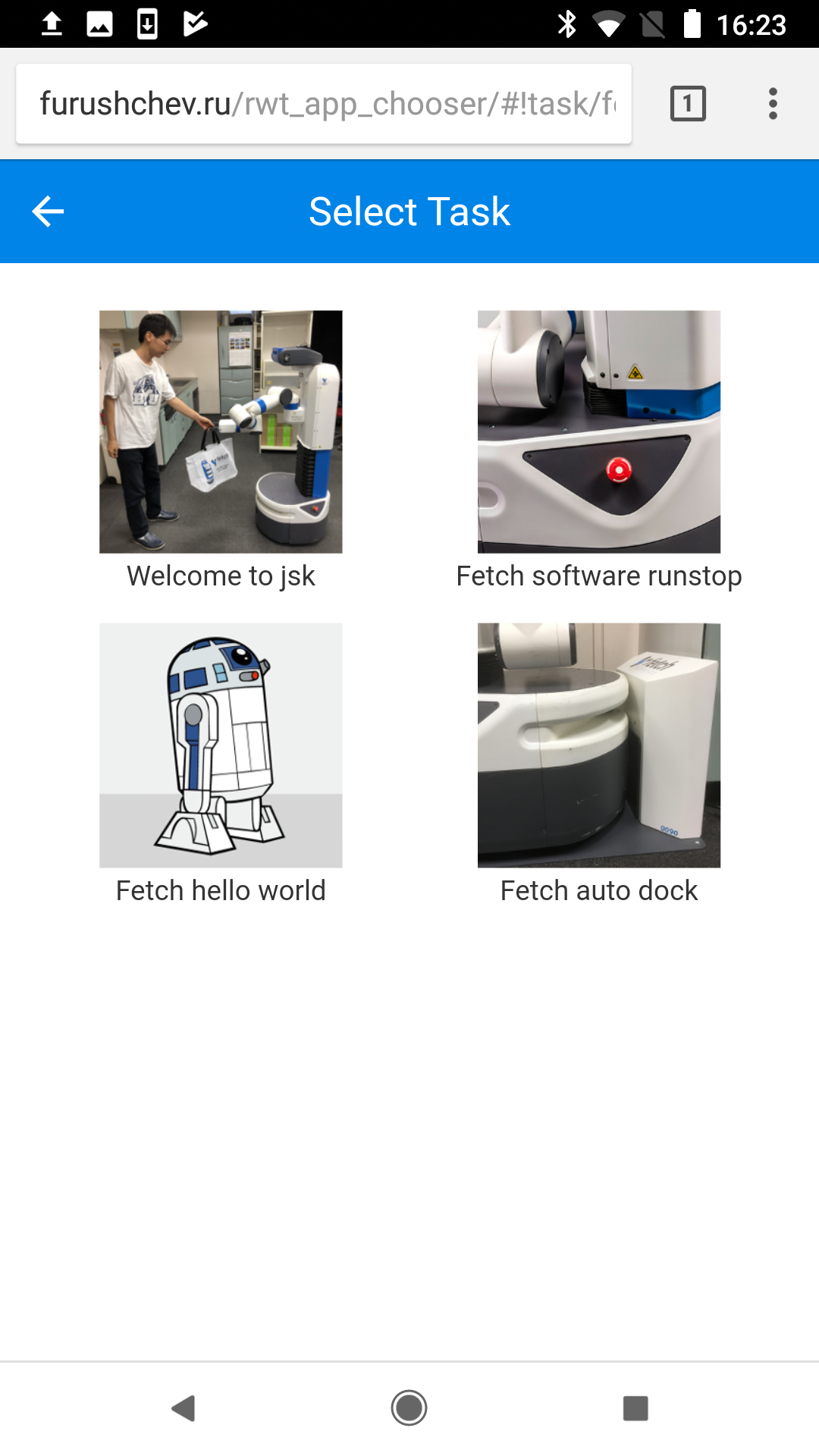
Could not convert RST to MD: No such file or directory - pandoc
Wiki Tutorials
Source Tutorials
Package Dependencies
System Dependencies
Dependant Packages
| Name | Repo | Deps |
|---|---|---|
| jsk_robot | github-jsk-ros-pkg-jsk_robot |
Launch files
- launch/fetch_gazebo_bringup.launch
-
- launch_gazebo [default: true]
- launch_gui [default: true]
- launch_moveit [default: true]
- launch_move_base [default: true]
- paused [default: false]
- world [default: worlds/empty.world]
- map_frame [default: eng2]
- INITIAL_POSE_X [default: 0.0]
- INITIAL_POSE_Y [default: 0.0]
- INITIAL_POSE_Z [default: 0.0]
- INITIAL_POSE_YAW [default: 0.0]
- launch/fetch_bringup.launch
-
- launch_moveit [default: true]
- launch_teleop [default: true]
- launch_move_base [default: true]
- boot_sound [default: false]
- map_frame [default: eng2]
- map_file [default: $(find jsk_maps)/raw_maps/eng2-7f-0.05.yaml]
- keepout_map_file [default: $(find jsk_maps)/raw_maps/eng2-7f-0.05_keepout.yaml]
- launch/rviz.launch
- launch/gazebo/fetch_gazebo_73b2.launch
-
- INITIAL_POSE_X [default: 1.0]
- INITIAL_POSE_Y [default: 0.0]
- INITIAL_POSE_Z [default: 0.0]
- INITIAL_POSE_YAW [default: 0.0]
- launch/fetch_tweet.launch
-
- image_topics [default: /head_camera/rgb/image_rect_color]
- remap_odom_state [default: /odom_combined]
- test/roslaunch-check-fetch_bringup.xml
- apps/software_runstop/software_runstop.xml
- apps/go_to_kitchen/go_to_kitchen.xml
- apps/welcome_to_jsk/welcome_to_jsk.xml
- apps/call_k_okada/call_k_okada.xml
- apps/auto_dock/auto_dock.xml
- apps/hello_world/hello_world.xml
- apps/patrol/patrol.xml
- launch/fetch_teleop.xml
-
- enable_auto_dock [default: true]
- joy_device [default: /dev/ps3joy]
- launch_fetch_bringup_teleop [default: false]
- launch/fetch_lifelog.xml
-
- use_system_mongod [default: true]
- map_frame [default: map]
- vital_check [default: false]
- launch/fetch_sensors.xml
-
- throttled_rate [default: 5.0]
- launch_manager [default: true]
- throttle_head_rgb [default: true]
- throttle_head_depth [default: true]
- throttle_head_cloud [default: true]
- throttle_base_scan [default: true]
- manager [default: head_camera/head_camera_nodelet_manager]
- manager [default: throttle_nodelet_manager]
Messages
Services
Plugins
Recent questions tagged jsk_fetch_startup at answers.ros.org
Package Summary
| Tags | No category tags. |
| Version | 1.1.0 |
| License | BSD |
| Build type | CATKIN |
| Use | RECOMMENDED |
Repository Summary
| Checkout URI | https://github.com/jsk-ros-pkg/jsk_robot.git |
| VCS Type | git |
| VCS Version | master |
| Last Updated | 2019-05-23 |
| Dev Status | DEVELOPED |
| Released | RELEASED |
Package Description
Additional Links
Maintainers
- Kei Okada
Authors
jsk_fetch_startup
SetUp (Running following commands in the first time)
upstart
su -c 'rosrun jsk_fetch_startup install_upstart.sh'
mongodb
sudo mkdir -p /var/lib/robot/mongodb_store/

# to see the db items from http://lcoalhost/rockmongo
sudo apt-get install apache2 libapache2-mod-php5 php5-mongo
wget "http://rockmongo.com/downloads/go?id=14" -O rockmongo.zip
unzip rockmongo.zip
sudo mv rockmongo-1.1.7 /var/www/html/rockmongo
# manually change following line in /var/www/html/rockmongo/config.php
# $MONGO["servers"][$i]["control_auth"] = false; // true;//enable control users, works only if mongo_auth=false
Teleoperation
Below is a flow of commands from Joystick sent to base controller:
Maintenance
re-roslaunch jsk_fetch_startup fetch_bringup.launch
sudo service jsk-fetch-startup restart
as of 2016/10/26, it uses launch files under ~k-okada/catkin_ws
re-roslaunch fetch_bringup fetch.launch
sudo service robot restart
Clock Synchronization
install chrony and add
server `gethostip -d fetch15` offline minpoll 8
to /etc/chrony/chrony.conf, restart chronyd by sudo /etc/init.d/chrony restart and wait for few seconds, if you get
$ chronyc tracking
Reference ID    : 133.11.216.145 (fetch15.jsk.imi.i.u-tokyo.ac.jp)
Stratum         : 4
Ref time (UTC)  : Wed Oct 26 12:32:56 2016
System time     : 0.000006418 seconds fast of NTP time
Last offset     : 0.003160040 seconds
RMS offset      : 0.003160040 seconds
Frequency       : 11.749 ppm fast
Residual freq   : -137.857 ppm
Skew            : 6.444 ppm
Root delay      : 0.185045 seconds
Root dispersion : 0.018803 seconds
Update interval : 2.1 seconds
Leap status     : Normal
it works, if you get 127.127.1.1 for Reference ID, something wrong
Network
General description
Fetch has wired and wireless network connections. If we use both of wired and wireless connections as DHCP, DNS holds two IP addresses for same hostname (fetch15 in this case). This cause problems in network such as ROS communication or ssh connection.
The solution we take now (2016/11/01) is using wired connection as static IP. By doing so, DNS holds only one IP adress (for wireless connection) for fetch hostname.
Case description
If you see the following result, it is OK.
$ nslookup fetch15.jsk.imi.i.u-tokyo.ac.jp
Server:         127.0.1.1
Address:        127.0.1.1#53

Name:           fetch15.jsk.imi.i.u-tokyo.ac.jp
Address: 133.11.216.145
If two or more IP addresses apper, something is wrong. Please connect display, open a window of network manager, and check that wired connection uses static IP.
Access point
Define access point setting, such as ssid:
/etc/wpa_supplicant/wpa_supplicant.conf
Network status log
You can see network status log, such as radio field intensity or data signaling rate:
/var/log/wifi.log
Logging script is initialized at:
/etc/init/jsk-log-wifi.conf
Administration
- 2016/10/26 add
allow 133.11.216/8to /etc/chrony/chrony.conf - 2018/08/26 add
0 10 * * 1-5 /home/fetch/ros/indigo_robot/devel/env.sh rosservice call /fetch15/start_app "name: 'jsk_fetch_startup/go_to_kitchen'"to crontab-
fetchgoes to 73B2 kitchen at 10:00 AM from Monday to Friday.
-
- 2019/04/19: add
fetchuser inpulse-accessgroup. - 2019/04/19: set
start on runlevel [2345]in/etc/init/pulseaudio.conf.- this modification is needed for starting
pulseaudioin boot. -
pulseaudiois required to register USB speaker on head in boot.
- this modification is needed for starting
- 2019/04/19: set
env DISALLOW_MODULE_LOADING=0in/etc/init/pulseaudio.conf.- this modification is needed for overriding default speaker setting in
/etc/init/jsk-fetch-startup.conf - overriding default speaker setting to use USB speaker on head is done with
pactl set-default-sink $AUDIO_DEVICEin/etc/init/jsk-fetch-startup.conf
- this modification is needed for overriding default speaker setting in
- 2019/04/19: launch
jsk_fetch_startup/fetch_bringup.launchbyfetchuser in/etc/init/jsk-fetch-startup.conf- some nodes save files by
fetchuser
- some nodes save files by
- 2019/04/19: add arg
launch_teleopin/etc/ros/indigo/robot.launch.- We sent PR to upstream fetchrobotics/fetch_robots PR#40.
- 2019/04/19: run
/etc/ros/indigo/robot.launchwitharglaunch_teleop:=false.-
teleopin/etc/ros/indigo/robot.launchnodes were conflicted withteleopnodes in jsk_fetch_startup/launch/fetch_teleop.xml
-
Apps
Note
You can not run this on Firefox. Please use Google Chrome.
Add fetch to rwt_app_chooser
- Access http://tork-a.github.io/visualization_rwt/rwt_app_chooser.
- Click
ADD A ROBOTbutton - Select
FetchatRobot type - Type
fetch15atRobot name - Type
ws://{fetch's IP adress}:9090/atRobot URI - Click
ADD ROBOTbutton
Execute demos
- Click
fetch15atSelect Robotwindow - Select task which are shown with icons.
Could not convert RST to MD: No such file or directory - pandoc
Wiki Tutorials
Source Tutorials
Package Dependencies
System Dependencies
Dependant Packages
| Name | Repo | Deps |
|---|---|---|
| jsk_robot | github-jsk-ros-pkg-jsk_robot |
Launch files
- launch/fetch_gazebo_bringup.launch
-
- launch_gazebo [default: true]
- launch_gui [default: true]
- launch_moveit [default: true]
- launch_move_base [default: true]
- paused [default: false]
- world [default: worlds/empty.world]
- map_frame [default: eng2]
- INITIAL_POSE_X [default: 0.0]
- INITIAL_POSE_Y [default: 0.0]
- INITIAL_POSE_Z [default: 0.0]
- INITIAL_POSE_YAW [default: 0.0]
- launch/fetch_bringup.launch
-
- launch_moveit [default: true]
- launch_teleop [default: true]
- launch_move_base [default: true]
- boot_sound [default: false]
- map_frame [default: eng2]
- map_file [default: $(find jsk_maps)/raw_maps/eng2-7f-0.05.yaml]
- keepout_map_file [default: $(find jsk_maps)/raw_maps/eng2-7f-0.05_keepout.yaml]
- launch/rviz.launch
- launch/gazebo/fetch_gazebo_73b2.launch
-
- INITIAL_POSE_X [default: 1.0]
- INITIAL_POSE_Y [default: 0.0]
- INITIAL_POSE_Z [default: 0.0]
- INITIAL_POSE_YAW [default: 0.0]
- launch/fetch_tweet.launch
-
- image_topics [default: /head_camera/rgb/image_rect_color]
- remap_odom_state [default: /odom_combined]
- test/roslaunch-check-fetch_bringup.xml
- apps/software_runstop/software_runstop.xml
- apps/go_to_kitchen/go_to_kitchen.xml
- apps/welcome_to_jsk/welcome_to_jsk.xml
- apps/call_k_okada/call_k_okada.xml
- apps/auto_dock/auto_dock.xml
- apps/hello_world/hello_world.xml
- apps/patrol/patrol.xml
- launch/fetch_teleop.xml
-
- enable_auto_dock [default: true]
- joy_device [default: /dev/ps3joy]
- launch_fetch_bringup_teleop [default: false]
- launch/fetch_lifelog.xml
-
- use_system_mongod [default: true]
- map_frame [default: map]
- vital_check [default: false]
- launch/fetch_sensors.xml
-
- throttled_rate [default: 5.0]
- launch_manager [default: true]
- throttle_head_rgb [default: true]
- throttle_head_depth [default: true]
- throttle_head_cloud [default: true]
- throttle_base_scan [default: true]
- manager [default: head_camera/head_camera_nodelet_manager]
- manager [default: throttle_nodelet_manager]