
Repository Summary
| Checkout URI | https://github.com/doosan-robotics/doosan-robot.git |
| VCS Type | git |
| VCS Version | melodic-devel |
| Last Updated | 2019-04-23 |
| Dev Status | DEVELOPED |
| Released | UNRELEASED |
Packages
| Name | Version |
|---|---|
| doosan_robot | 0.9.5 |
| doosan_robotics | 0.9.5 |
| dsr_bringup | 0.9.5 |
| dsr_control | 0.9.5 |
| dsr_description | 0.9.5 |
| dsr_example_cpp | 0.9.5 |
| dsr_example_py | 0.9.5 |
| dsr_gazebo | 0.9.5 |
| dsr_launcher | 0.9.5 |
| dsr_msgs | 0.9.5 |
| moveit_config_m0609 | 0.9.5 |
| moveit_config_m0617 | 0.9.5 |
| moveit_config_m1013 | 0.9.5 |
| moveit_config_m1509 | 0.9.5 |
README
Doosan robotics
build
The interactive_marker_twist_server must be installed manually in melodic.
### We recoomand the /home/<user_home>/catkin_ws/src
cd -/catkin_ws/src
git clone https://github.com/doosan-robotics/doosan-robot
rosdep install --from-paths doosan-robot --ignore-src --rosdistro melodic -r -y

cd ~/catkin_ws/src git clone https://github.com/ros-visualization/interactive_marker_twist_server.git
cd ~/catkin_ws
catkin_make
source ~/catkin_ws/devel/setup.bash
package list
sudo apt-get install ros-melodic-rqt* ros-melodic-moveit* ros-melodic-industrial-core ros-melodic-gazebo-ros-control ros-melodic-joint-state-controller ros-melodic-effort-controllers ros-melodic-position-controllers ros-melodic-ros-controllers ros-melodic-ros-control ros-melodic-serial
packages for mobile robot The interactive_marker_twist_server must be installed manually in melodic.
sudo apt-get ros-melodic-lms1xx ros-melodic-twist-mux ros-melodic-imu-tools ros-melodic-controller-manager ros-melodic-robot-localization
usage
DRCF Emulator
If you don`t have real doosan controller, you must excute our emulator. Emulator has local IP(127.0.0.1) default port=12345.
cd ~/catkin_ws/doosan-robot/common/bin/DRCF
sudo ./DRCF64 <port>   ## 64bits OS
$ sudo ./DRCF64 12345

dsr_description
roslaunch dsr_description m0609.launch
roslaunch dsr_description m1013.launch color:=blue # Change Color
roslaunch dsr_description m1509.launch gripper:=robotiq_2f # insert robotiq gripper
roslaunch dsr_description m0617.launch color:=blue gripper:=robotiq_2f # change color & insert robotiq gripper
$ roslaunch dsr_description m1013.launch
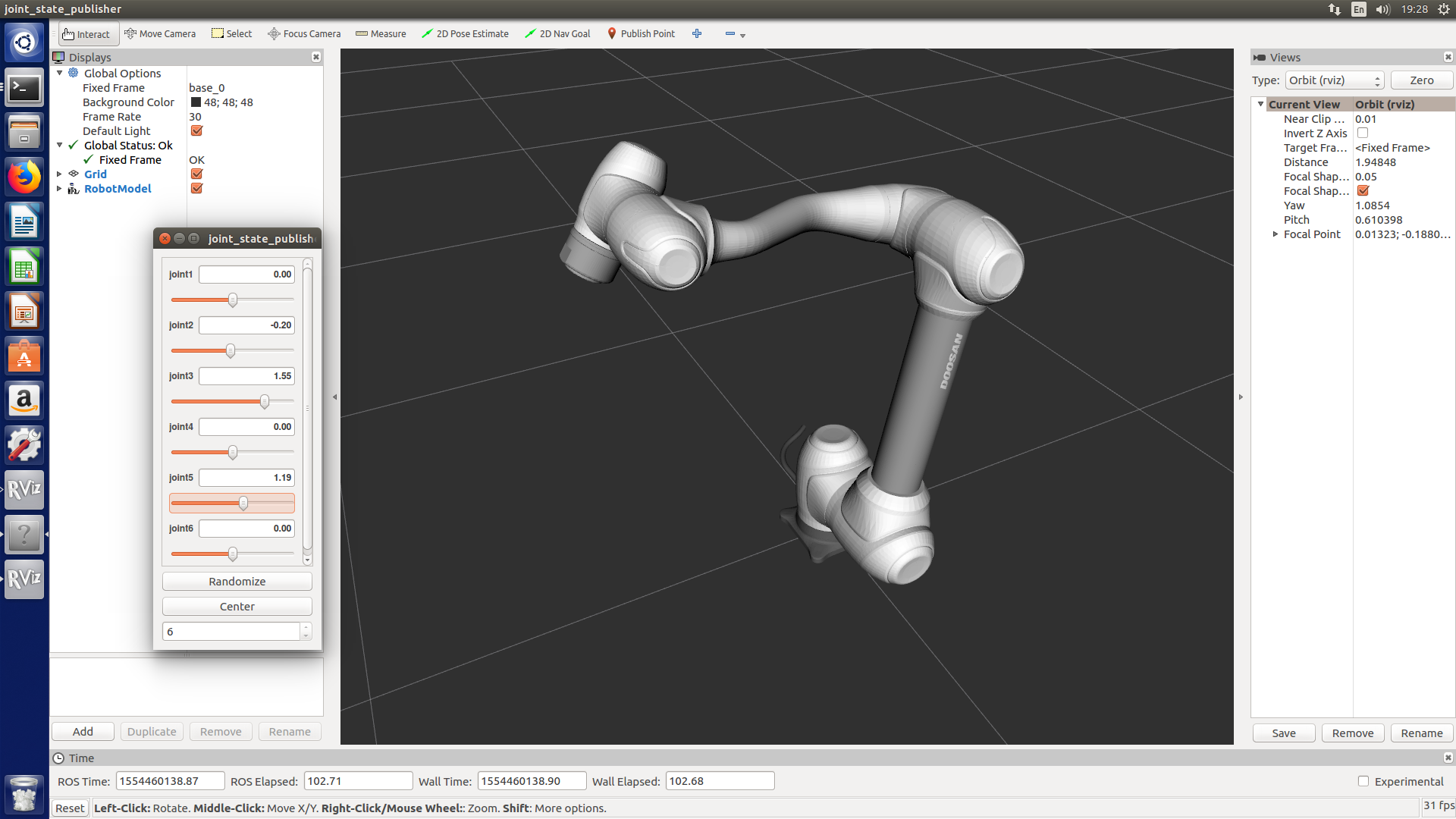
- In dsr_description, the user can use joint_state_publisher to move the robot.
- Joint_state_publisher
$ roslaunch dsr_description m0617.launch color:=blue gripper:=robotiq_2f

dsr_moveit_config
arguments
color:= ROBOT_COLOR
defalut = white
roslaunch moveit_config_m0609 m0609.launch
roslaunch moveit_config_m0617 m0617.launch
roslaunch moveit_config_m1013 m1013.launch color:=blue
roslaunch moveit_config_m1509 m1509.launch

dsr_control (default model:= m1013, default mode:= virtual)
arguments
host := ROBOT_IP defalut = 192,168.137.100
port := ROBOT_PORT default = 12345
mode := OPERATION MODEdefalut = virtual
model := ROBOT_MODELdefalut = m1013
color := ROBOT_COLORdefalut = white
gripper := USE_GRIPPERdefalut = none
mobile := USE_MOBILEdefalut = none
dsr_control + dsr_moveit_config
roslaunch dsr_control dsr_moveit.launch
roslaunch dsr_control dsr_moveit.launch model:=m0609 mode:=virtual
roslaunch dsr_control dsr_moveit.launch model:=m0617 mode:=virtual
roslaunch dsr_control dsr_moveit.launch model:=m1013 mode:=virtual
roslaunch dsr_control dsr_moveit.launch model:=m1509 mode:=virtual
dsr_launcher
If you don`t have real doosan controller, you must execute emulator before run dsr_launcer.
arguments
host:= ROBOT_IP defalut = 192.168.137.100 ##Emulator IP = 127.0.0.1
port:= ROBOT_PORT default = 12345
mode:= OPERATION MODEdefalut = virtual
model:= ROBOT_MODELdefalut = m1013
color:= ROBOT_COLORdefalut = white
gripper:= USE_GRIPPERdefalut = none
mobile:= USE_MOBILEdefalut = none
roslaunch dsr_launcher single_robot_rviz.launch host:=127.0.0.1 port:=12345 mode:=virtual model:=m1013 color:=blue gripper:=none mobile:=none
roslaunch dsr_launcher single_robot_gazebo.launch host:=192.168.137.100
roslaunch dsr_launcher single_robot_rviz_gazebo.launch gripper:=robotiq_2f mobile:=husky
roslaunch dsr_launcher multi_robot_rviz.launch
roslaunch dsr_launcher multi_robot_gazebo.launch model:=m0609
roslaunch dsr_launcher multi_robot_rviz_gazebo.launch
dsr_example
single robot
<launch>
  single robot in rviz : roslaunch dsr_launcher single_robot_rviz.launch model:=m1013 color:=white
  single robot in gazebo : roslaunch dsr_launcher single_robot_gazebo.launch model:=m1013 color:=blue
  single robot in rviz + gazebo : roslaunch dsr_launcher single_robot_rviz_gazebo.launch model:=m1013 color:=white
<run application node>
  <cpp>
    basic example : rosrun dsr_example_cpp single_robot_basic dsr01 m1013
    simple example : rosrun dsr_example_cpp single_robot_simple dsr01 m1013
  <py>
    basic example : rosrun dsr_example_py single_robot_basic.py dsr01 m1013
    simple example : rosrun dsr_example_py single_robot_simple.py dsr01 m1013
<ex>
  roslaunch dsr_launcher single_robot_rviz_gazebo.launch model:=m1013 color:=white
  rosrun dsr_example_cpp single_robot_simple dsr01 m1013
$ roslaunch dsr_launcher single_robot_rviz_gazebo.launch
$ rosrun dsr_example_cpp single_robot_simple

multi robot
<launch>
  multi robot in rviz : roslaunch dsr_launcher multi_robot_rviz.launch
  multi robot in gazebo : roslaunch dsr_launcher multi_robot_gazebo.launch
  multi robot in rviz + gazebo : roslaunch dsr_launcher multi_robot_rviz_gazebo.launch
<run application node>
  <cpp>
    basic example : rosrun dsr_example_cpp multi_robot_basic
    simple example : rosrun dsr_example_cpp multi_robot_simple
  <py>
    basic example : rosrun dsr_example_py multi_robot_basic.py
    simple example : rosrun dsr_example_py multi_robot_simple.py
  <ex>
    roslaunch dsr_launcher multi_robot_rviz_gazebo.launch
    rosrun dsr_example_cpp multi_robot
$ roslaunch dsr_launcher multi_robot_rviz_gazebo.launch
$ rosrun dsr_example_cpp multi_robot

robot + gripper
insert argument gripper:=robotiq_2f
- single robot + gripper
roslaunch dsr_launcher single_robot_rviz.launch gripper:=robotiq_2f

<run application node>
  <cpp>
    rosrun dsr_example_cpp pick_and_place
  <python>
    rosrun dsr_example_py pick_and_place.py
- Serial Test(Loopback)
rosrun dsr_example_cpp serial_example_node ttyUSB0 115200
rostopic echo /serial_read
rostopic pub /serial_write std_msgs/String 'data: 100'
robot + mobile
insert argument mobile:=husky - single robot on mobile
roslaunch dsr_launcher single_robot_rviz.launch mobile:=husky

<run application node>
  <cpp>
    rosrun dsr_example_cpp single_robot_mobile
  <python>
    rosrun dsr_example_py single_robot_mobile.py
$ roslaunch dsr_launcher single_robot_rviz mobile:=husky color:=blue

- multi robot on mobile
roslaunch dsr_launcher multi_robot_rviz.launch mobile:=husky

<run application node>
  <cpp>
    rosrun dsr_example_cpp multi_robot_mobile
  <python>
    rosrun dsr_example_py multi_robot_mobile.py
$ roslaunch dsr_launcher multi_robot_rviz mobile:=husky
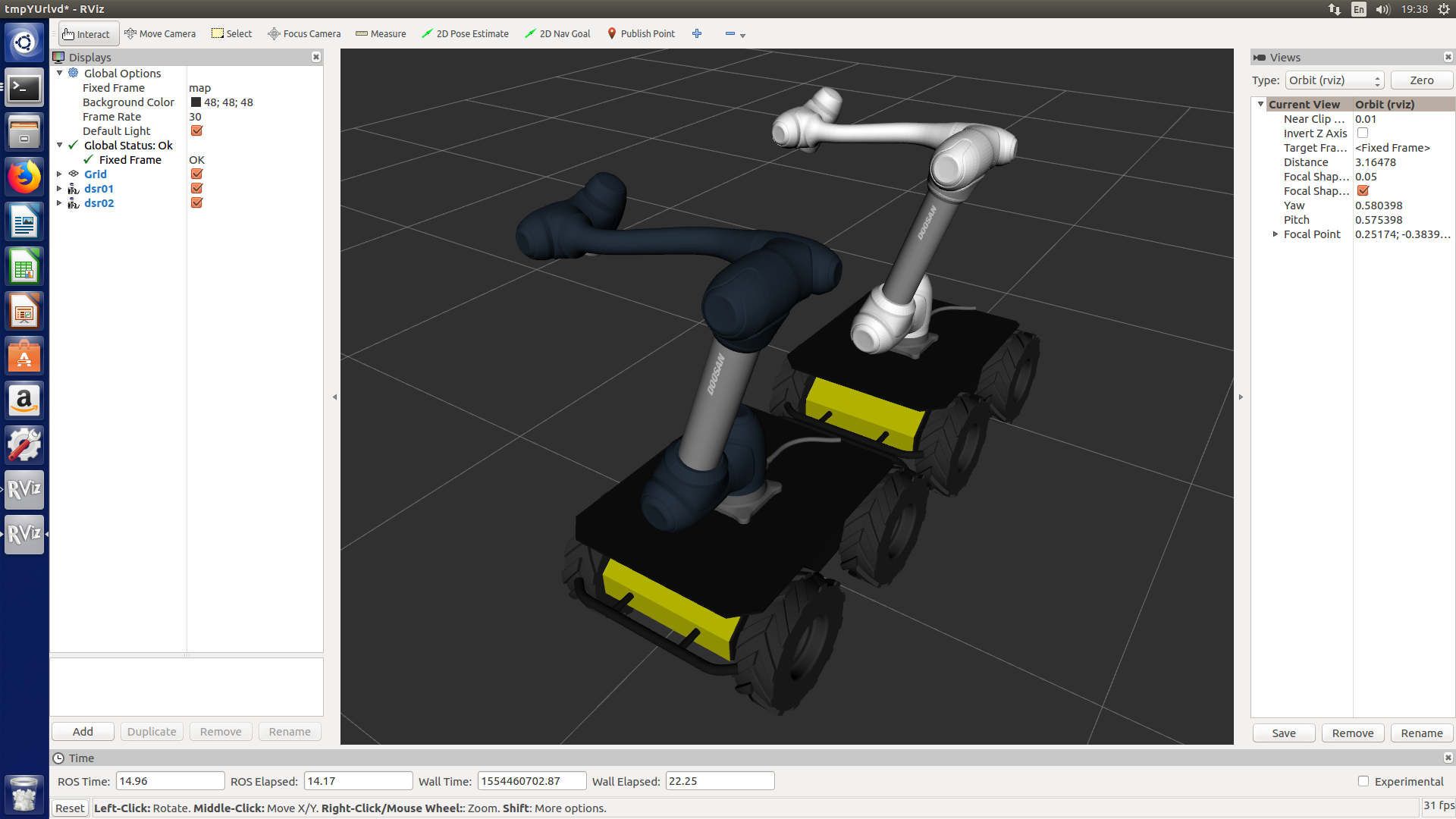
gazebo+rviz+virtual
roslaunch dsr_example test.launch
rosrun dsr_test_cpp dsr_test
  <include file="$(find dsr_gazebo)/launch/dsr_base.launch">
    <arg name="ns" value="dsr01"/> # Robot ID
    <arg name="model" value="m1013"/> # Robot Model
    <arg name="host" value="192.168.137.100"/> # Robot IP
    <arg name="port" value="12345"/> # Robot Port
    <arg name="mode" value="virtual"/> # Robot Controller Mode
    # Position & Posture in Gazebo
    <arg name="x" value="2"/>
    <arg name="y" value="-4"/>
    <arg name="yaw" value="0.7"/>
  </include>
  <include file="$(find dsr_gazebo)/launch/dsr_base.launch">
    <arg name="ns" value="dsr02"/> # Secondary Robot ID
    <arg name="model" value="m1013"/> # Secondary Robot Model
    <arg name="host" value="192.168.137.102"/> # Secondary Robot IP
    <arg name="port" value="12346"/> # Robot Port
    <arg name="mode" value="virtual"/> # Secondary Robot Controller Mode
    # Secondary Position & Posture in Gazebo
    <arg name="x" value="2"/>
    <arg name="y" value="-4"/>
    <arg name="yaw" value="0.7"/>
  </include>
Run multi-robot by command line
roslaunch dsr_launcher test.launch
rostopic pub /dsr01m1013/joint_position_controller/command std_msgs/Float64MultiArray "layout:
  dim:
  - label: ''
    size: 0
    stride: 0
    data_offset: 0
data: [10, 10, 40, 10, 60, 10]"
Service Call
rosservice call /dsr/set_joint_move "jointAngle: [0.0, 0.0, 0.0, 0.0, 0.0, 0.0]
jointVelocity: [50.0, 0.0, 0.0, 0.0, 0.0, 0.0]
jointAcceleration: [50.0, 0.0, 0.0, 0.0, 0.0, 0.0]
radius: 0.0"
manuals
demo
Doosan-Robots In Gazebo

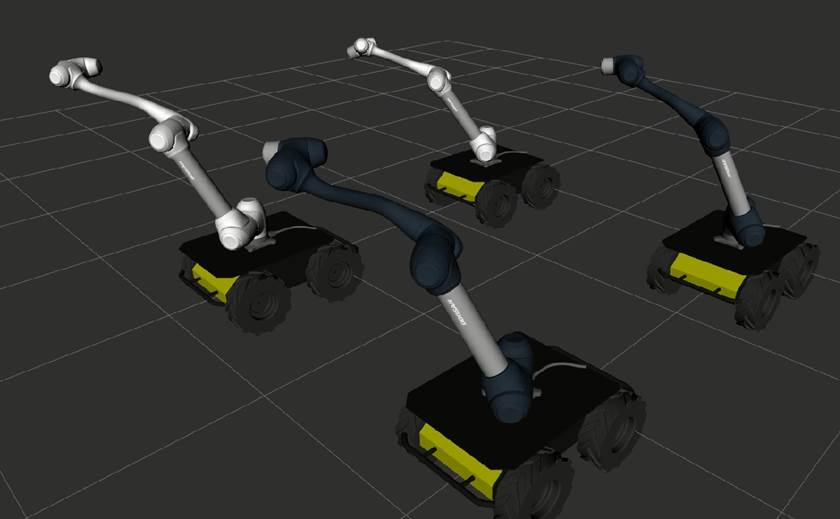
Doosan-Robots & Mobile in Rviz
Repository Summary
| Checkout URI | https://github.com/doosan-robotics/doosan-robot.git |
| VCS Type | git |
| VCS Version | master |
| Last Updated | 2019-05-21 |
| Dev Status | DEVELOPED |
| Released | RELEASED |
Packages
| Name | Version |
|---|---|
| robotiq_gazebo | 0.1.0 |
| doosan_robot | 0.9.6 |
| doosan_robotics | 0.9.6 |
| dsr_control | 0.9.6 |
| dsr_description | 0.9.6 |
| dsr_example_cpp | 0.9.6 |
| dsr_example_py | 0.9.6 |
| dsr_gazebo | 0.9.6 |
| dsr_launcher | 0.9.6 |
| dsr_msgs | 0.9.6 |
| moveit_config_m0609 | 0.9.6 |
| moveit_config_m0617 | 0.9.6 |
| moveit_config_m1013 | 0.9.6 |
| moveit_config_m1509 | 0.9.6 |
README
Doosan robotics
build
### We recoomand the /home/<user_home>/catkin_ws/src
cd ~/catkin_ws/src
git clone https://github.com/doosan-robotics/doosan-robot
rosdep install --from-paths doosan-robot --ignore-src --rosdistro kinetic -r -y
cd ~/catkin_ws
catkin_make
source ./devel/setup.bash
package list
sudo apt-get install ros-kinetic-rqt* ros-kinetic-moveit* ros-kinetic-industrial-core ros-kinetic-gazebo-ros-control ros-kinetic-joint-state-controller ros-kinetic-effort-controllers ros-kinetic-position-controllers ros-kinetic-ros-controllers ros-kinetic-ros-control ros-kinetic-serial
packages for mobile robot
sudo apt-get ros-kinetic-lms1xx ros-kinetic-interactive-marker-twist-server ros-kinetic-twist-mux ros-kinetic-imu-tools ros-kinetic-controller-manager ros-kinetic-robot-localization
usage
DRCF Emulator
If you don`t have real doosan controller, you must excute our emulator. Emulator has local IP(127.0.0.1) default port=12345.
cd ~/catkin_ws/src/doosan-robot/common/bin/DRCF
sudo ./DRCF64 <port>   ## 64bits OS
or
sudo ./DRCF32 <port>   ## 32bits OS
$ sudo ./DRCF64 12345
dsr_description
roslaunch dsr_description m0609.launch
roslaunch dsr_description m1013.launch color:=blue # Change Color
roslaunch dsr_description m1509.launch gripper:=robotiq_2f # insert robotiq gripper
roslaunch dsr_description m0617.launch color:=blue gripper:=robotiq_2f # change color & insert robotiq gripper
$ roslaunch dsr_description m1013.launch
- In dsr_description, the user can use joint_state_publisher to move the robot.
- Joint_state_publisher
$ roslaunch dsr_description m0617.launch color:=blue gripper:=robotiq_2f
dsr_moveit_config
arguments
color:= ROBOT_COLOR
defalut = white
roslaunch moveit_config_m0609 m0609.launch
roslaunch moveit_config_m0617 m0617.launch
roslaunch moveit_config_m1013 m1013.launch color:=blue
roslaunch moveit_config_m1509 m1509.launch
dsr_control (default model:= m1013, default mode:= virtual)
arguments
host := ROBOT_IP defalut = 192.168.127.100
port := ROBOT_PORT default = 12345
mode := OPERATION MODEdefalut = virtual
model := ROBOT_MODELdefalut = m1013
color := ROBOT_COLORdefalut = white
gripper := USE_GRIPPERdefalut = none
mobile := USE_MOBILEdefalut = none
dsr_control + dsr_moveit_config
roslaunch dsr_control dsr_moveit.launch
roslaunch dsr_control dsr_moveit.launch model:=m0609 mode:=virtual
roslaunch dsr_control dsr_moveit.launch model:=m0617 mode:=virtual
roslaunch dsr_control dsr_moveit.launch model:=m1013 mode:=virtual
roslaunch dsr_control dsr_moveit.launch model:=m1509 mode:=virtual
dsr_launcher
If you don`t have real doosan controller, you must execute emulator before run dsr_launcer.
arguments
host:= ROBOT_IP defalut = 192.168.127.100 ##Emulator IP = 127.0.0.1
port:= ROBOT_PORT default = 12345
mode:= OPERATION MODEdefalut = virtual
model:= ROBOT_MODELdefalut = m1013
color:= ROBOT_COLORdefalut = white
gripper:= USE_GRIPPERdefalut = none
mobile:= USE_MOBILEdefalut = none
roslaunch dsr_launcher single_robot_rviz.launch host:=127.0.0.1 port:=12345 mode:=virtual model:=m1013 color:=blue gripper:=none mobile:=none
roslaunch dsr_launcher single_robot_gazebo.launch host:=192.168.127.100
roslaunch dsr_launcher single_robot_rviz_gazebo.launch gripper:=robotiq_2f mobile:=husky
roslaunch dsr_launcher multi_robot_rviz.launch
roslaunch dsr_launcher multi_robot_gazebo.launch model:=m0609
roslaunch dsr_launcher multi_robot_rviz_gazebo.launch
dsr_example
single robot
<launch>
  single robot in rviz : roslaunch dsr_launcher single_robot_rviz.launch model:=m1013 color:=white
  single robot in gazebo : roslaunch dsr_launcher single_robot_gazebo.launch model:=m1013 color:=blue
  single robot in rviz + gazebo : roslaunch dsr_launcher single_robot_rviz_gazebo.launch model:=m1013 color:=white
<run application node>
  <cpp>
    basic example : rosrun dsr_example_cpp single_robot_basic dsr01 m1013
    simple example : rosrun dsr_example_cpp single_robot_simple dsr01 m1013
  <py>
    basic example : rosrun dsr_example_py single_robot_basic.py dsr01 m1013
    simple example : rosrun dsr_example_py single_robot_simple.py dsr01 m1013
<ex>
  roslaunch dsr_launcher single_robot_rviz_gazebo.launch model:=m1013 color:=white
  rosrun dsr_example_cpp single_robot_simple dsr01 m1013
$ roslaunch dsr_launcher single_robot_rviz_gazebo.launch
$ rosrun dsr_example_cpp single_robot_simple
multi robot
<launch>
  multi robot in rviz : roslaunch dsr_launcher multi_robot_rviz.launch
  multi robot in gazebo : roslaunch dsr_launcher multi_robot_gazebo.launch
  multi robot in rviz + gazebo : roslaunch dsr_launcher multi_robot_rviz_gazebo.launch
<run application node>
  <cpp>
    basic example : rosrun dsr_example_cpp multi_robot_basic
    simple example : rosrun dsr_example_cpp multi_robot_simple
  <py>
    basic example : rosrun dsr_example_py multi_robot_basic.py
    simple example : rosrun dsr_example_py multi_robot_simple.py
  <ex>
    roslaunch dsr_launcher multi_robot_rviz_gazebo.launch
    rosrun dsr_example_cpp multi_robot
$ roslaunch dsr_launcher multi_robot_rviz_gazebo.launch
$ rosrun dsr_example_cpp multi_robot
robot + gripper
insert argument gripper:=robotiq_2f
- single robot + gripper
roslaunch dsr_launcher single_robot_rviz.launch gripper:=robotiq_2f

<run application node>
  <cpp>
    rosrun dsr_example_cpp pick_and_place
  <python>
    rosrun dsr_example_py pick_and_place.py
- Serial Test(Loopback)
rosrun dsr_example_cpp serial_example_node ttyUSB0 115200
rostopic echo /serial_read
rostopic pub /serial_write std_msgs/String 'data: 100'
robot + mobile
insert argument mobile:=husky - single robot on mobile
roslaunch dsr_launcher single_robot_rviz.launch mobile:=husky

<run application node>
  <cpp>
    rosrun dsr_example_cpp single_robot_mobile
  <python>
    rosrun dsr_example_py single_robot_mobile.py
$ roslaunch dsr_launcher single_robot_rviz mobile:=husky color:=blue
- multi robot on mobile
roslaunch dsr_launcher multi_robot_rviz.launch mobile:=husky

<run application node>
  <cpp>
    rosrun dsr_example_cpp multi_robot_mobile
  <python>
    rosrun dsr_example_py multi_robot_mobile.py
$ roslaunch dsr_launcher multi_robot_rviz mobile:=husky
gazebo+rviz+virtual
roslaunch dsr_example test.launch
rosrun dsr_test_cpp dsr_test
  <include file="$(find dsr_gazebo)/launch/dsr_base.launch">
    <arg name="ns" value="dsr01"/> # Robot ID
    <arg name="model" value="m1013"/> # Robot Model
    <arg name="host" value="192.168.127.100"/> # Robot IP
    <arg name="port" value="12345"/> # Robot Port
    <arg name="mode" value="virtual"/> # Robot Controller Mode
    # Position & Posture in Gazebo
    <arg name="x" value="2"/>
    <arg name="y" value="-4"/>
    <arg name="yaw" value="0.7"/>
  </include>
  <include file="$(find dsr_gazebo)/launch/dsr_base.launch">
    <arg name="ns" value="dsr02"/> # Secondary Robot ID
    <arg name="model" value="m1013"/> # Secondary Robot Model
    <arg name="host" value="192.168.127.102"/> # Secondary Robot IP
    <arg name="port" value="12346"/> # Robot Port
    <arg name="mode" value="virtual"/> # Secondary Robot Controller Mode
    # Secondary Position & Posture in Gazebo
    <arg name="x" value="2"/>
    <arg name="y" value="-4"/>
    <arg name="yaw" value="0.7"/>
  </include>
Run multi-robot by command line
roslaunch dsr_launcher test.launch
rostopic pub /dsr01m1013/joint_position_controller/command std_msgs/Float64MultiArray "layout:
  dim:
  - label: ''
    size: 0
    stride: 0
    data_offset: 0
data: [10, 10, 40, 10, 60, 10]"
Service Call
rosservice call /dsr/set_joint_move "jointAngle: [0.0, 0.0, 0.0, 0.0, 0.0, 0.0]
jointVelocity: [50.0, 0.0, 0.0, 0.0, 0.0, 0.0]
jointAcceleration: [50.0, 0.0, 0.0, 0.0, 0.0, 0.0]
radius: 0.0"
manuals
demo
Please contact ros.robotics@doosan.com for demo usage instructions below.
Doosan-Robots In Gazebo
Doosan-Robots & Mobile in Rviz