
Repository Summary
| Checkout URI | https://github.com/pal-robotics/aruco_ros.git |
| VCS Type | git |
| VCS Version | kinetic-devel |
| Last Updated | 2019-04-12 |
| Dev Status | DEVELOPED |
| Released | RELEASED |
Packages
| Name | Version |
|---|---|
| aruco | 0.2.3 |
| aruco_msgs | 0.2.3 |
| aruco_ros | 0.2.3 |
README
aruco_ros
Software package and ROS wrappers of the Aruco Augmented Reality marker detector library.
Features
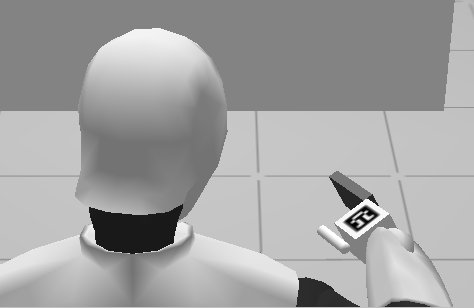
High-framerate tracking of AR markers
Generate AR markers with given size and optimized for minimal perceptive ambiguity (when there are more markers to track)
Enhanced precision tracking by using boards of markers
ROS wrappers
Applications
- Object pose estimation
- Visual servoing: track object and hand at the same time
ROS API
Messages
-
aruco_ros/Marker.msg
Header header uint32 id geometry_msgs/PoseWithCovariance pose float64 confidence -
aruco_ros/MarkerArray.msg
Header header
aruco_ros/Marker[] markers
Test it with REEM
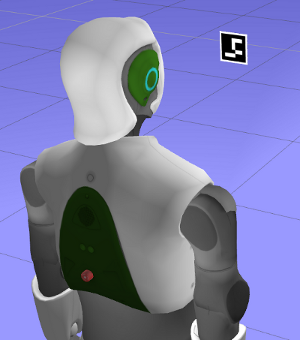
- Open a REEM in simulation with a marker floating in front of the robot. This will start the stereo cameras of the robot too. Since this is only a vision test, there is nothing else in this world apart from the robot and a marker floating in front of it. An extra light source had to be added to compensate for the default darkness.
roslaunch reem_gazebo reem_gazebo.launch world:=floating_marker
- Launch the
image_procnode to get undistorted images from the cameras of the robot.
ROS_NAMESPACE=/stereo/right rosrun image_proc image_proc image_raw:=image
- Start the
singlenode which will start tracking the specified marker and will publish its pose in the camera frame
roslaunch aruco_ros single.launch markerId:=26 markerSize:=0.08 eye:="right"
the frame in which the pose is refered to can be chosen with the 'ref_frame' argument. The next example forces the marker pose to
be published with respect to the robot base_link frame:
roslaunch aruco_ros single.launch markerId:=26 markerSize:=0.08 eye:="right" ref_frame:=/base_link
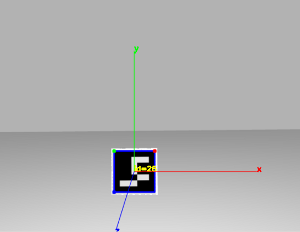
- Visualize the result
rosrun image_view image_view image:=/aruco_single/result
Repository Summary
| Checkout URI | https://github.com/pal-robotics/aruco_ros.git |
| VCS Type | git |
| VCS Version | indigo-devel |
| Last Updated | 2018-02-06 |
| Dev Status | DEVELOPED |
| Released | RELEASED |
Packages
| Name | Version |
|---|---|
| aruco | 0.2.2 |
| aruco_msgs | 0.2.2 |
| aruco_ros | 0.2.2 |
README
aruco_ros
Software package and ROS wrappers of the Aruco Augmented Reality marker detector library.
Features
High-framerate tracking of AR markers
Generate AR markers with given size and optimized for minimal perceptive ambiguity (when there are more markers to track)
Enhanced precision tracking by using boards of markers
ROS wrappers
Applications
- Object pose estimation
- Visual servoing: track object and hand at the same time
ROS API
Messages
-
aruco_ros/Marker.msg
Header header uint32 id geometry_msgs/PoseWithCovariance pose float64 confidence -
aruco_ros/MarkerArray.msg
Header header
aruco_ros/Marker[] markers
Test it with REEM
- Open a REEM in simulation with a marker floating in front of the robot. This will start the stereo cameras of the robot too. Since this is only a vision test, there is nothing else in this world apart from the robot and a marker floating in front of it. An extra light source had to be added to compensate for the default darkness.
roslaunch reem_gazebo reem_gazebo.launch world:=floating_marker
- Launch the
image_procnode to get undistorted images from the cameras of the robot.
ROS_NAMESPACE=/stereo/right rosrun image_proc image_proc image_raw:=image
- Start the
singlenode which will start tracking the specified marker and will publish its pose in the camera frame
roslaunch aruco_ros single.launch markerId:=26 markerSize:=0.08 eye:="right"
the frame in which the pose is refered to can be chosen with the 'ref_frame' argument. The next example forces the marker pose to
be published with respect to the robot base_link frame:
roslaunch aruco_ros single.launch markerId:=26 markerSize:=0.08 eye:="right" ref_frame:=/base_link
- Visualize the result
rosrun image_view image_view image:=/aruco_single/result
Repository Summary
| Checkout URI | https://github.com/pal-robotics/aruco_ros.git |
| VCS Type | git |
| VCS Version | indigo-devel |
| Last Updated | 2018-02-06 |
| Dev Status | DEVELOPED |
| Released | RELEASED |
Packages
| Name | Version |
|---|---|
| aruco | 0.2.2 |
| aruco_msgs | 0.2.2 |
| aruco_ros | 0.2.2 |
README
aruco_ros
Software package and ROS wrappers of the Aruco Augmented Reality marker detector library.
Features
High-framerate tracking of AR markers
Generate AR markers with given size and optimized for minimal perceptive ambiguity (when there are more markers to track)
Enhanced precision tracking by using boards of markers
ROS wrappers
Applications
- Object pose estimation
- Visual servoing: track object and hand at the same time
ROS API
Messages
-
aruco_ros/Marker.msg
Header header uint32 id geometry_msgs/PoseWithCovariance pose float64 confidence -
aruco_ros/MarkerArray.msg
Header header
aruco_ros/Marker[] markers
Test it with REEM
- Open a REEM in simulation with a marker floating in front of the robot. This will start the stereo cameras of the robot too. Since this is only a vision test, there is nothing else in this world apart from the robot and a marker floating in front of it. An extra light source had to be added to compensate for the default darkness.
roslaunch reem_gazebo reem_gazebo.launch world:=floating_marker
- Launch the
image_procnode to get undistorted images from the cameras of the robot.
ROS_NAMESPACE=/stereo/right rosrun image_proc image_proc image_raw:=image
- Start the
singlenode which will start tracking the specified marker and will publish its pose in the camera frame
roslaunch aruco_ros single.launch markerId:=26 markerSize:=0.08 eye:="right"
the frame in which the pose is refered to can be chosen with the 'ref_frame' argument. The next example forces the marker pose to
be published with respect to the robot base_link frame:
roslaunch aruco_ros single.launch markerId:=26 markerSize:=0.08 eye:="right" ref_frame:=/base_link
- Visualize the result
rosrun image_view image_view image:=/aruco_single/result
Repository Summary
| Checkout URI | https://github.com/pal-robotics/aruco_ros.git |
| VCS Type | git |
| VCS Version | master |
| Last Updated | 2016-10-18 |
| Dev Status | DEVELOPED |
| Released | UNRELEASED |
Packages
| Name | Version |
|---|---|
| aruco | 0.0.1 |
| aruco_msgs | 0.0.1 |
| aruco_ros | 0.0.1 |
README
aruco_ros
Software package and ROS wrappers of the Aruco Augmented Reality marker detector library.
Features
* High-framerate tracking of AR markers
* Generate AR markers with given size and optimized for minimal perceptive ambiguity (when there are more markers to track)
* Enhanced precision tracking by using boards of markers
* ROS wrappers
Applications
- Object pose estimation
- Visual servoing: track object and hand at the same time
ROS API
Messages
-
aruco_ros/Marker.msg
Header header uint32 id geometry_msgs/PoseWithCovariance pose float64 confidence -
aruco_ros/MarkerArray.msg
Header header
aruco_ros/Marker[] markers
Test it with REEM
- Open a REEM in simulation with a marker floating in front of the robot. This will start the stereo cameras of the robot too. Since this is only a vision test, there is nothing else in this world apart from the robot and a marker floating in front of it. An extra light source had to be added to compensate for the default darkness.
roslaunch reem_gazebo reem_gazebo.launch world:=floating_marker
- Launch the
image_procnode to get undistorted images from the cameras of the robot.
ROS_NAMESPACE=/stereo/right rosrun image_proc image_proc image_raw:=image
- Start the
singlenode which will start tracking the specified marker and will publish its pose in the camera frame
roslaunch aruco_ros single.launch markerId:=26 markerSize:=0.08 eye:="right"
the frame in which the pose is refered to can be chosen with the 'ref_frame' argument. The next example forces the marker pose to
be published with respect to the robot base_link frame:
roslaunch aruco_ros single.launch markerId:=26 markerSize:=0.08 eye:="right" ref_frame:=/base_link
- Visualize the result
rosrun image_view image_view image:=/aruco_single/result