
|
jog_controller package from jog_control repojog_control jog_controller jog_launch jog_msgs |
Package Summary
| Tags | No category tags. |
| Version | 0.0.1 |
| License | Apache License 2.0 |
| Build type | CATKIN |
| Use | RECOMMENDED |
Repository Summary
| Checkout URI | https://github.com/tork-a/jog_control.git |
| VCS Type | git |
| VCS Version | master |
| Last Updated | 2018-08-30 |
| Dev Status | DEVELOPED |
| Released | RELEASED |
Package Description
Additional Links
Maintainers
- Tokyo Opensource Robotics Kyokai(TORK) Developer Team
Authors
- Ryosuke Tajima
jog_controller
This package contains controller nodes for jog control. For now, it has two indivisual nodes, 'jog_joint_node' and 'frame_joint_node'.
Both nodes depend on MoveIt!, so you should make sure MoveIt! is available for your robot in advance.
Both nodes use PositionController which is provided by
ros_controllers/joint_trajectory_controller package.
jog_joint_node
'jog_joint_node' is for joint jogging. Joint jogging is to adjust the
target joint angle by small amount of displacement. You can send
JogJoint message
to command the target joint and differential angle (delta).
Subscribed topic
- joint_states (sensor_msgs/JointState)
Current joint states (angle, velocity, acceleration)
- jog_joint (jog_msgs/JogJoint)
Joint jog command
Required service / action
This package uses position_cotnroller to control joint angles. It read the controller configuration form MoveIt! parameter (move_group/controller_list), so MoveIt! should be available before this node starting.
- follow_joint_trajecotry/goal (control_msgs/FollowJointTrajectoryAction)
The goal joint angle to control
jog_frame_node
'jog_frame_node' is for frame jogging. Frame jogging is to adjust the
target frame position and orientation by small amount of
displacement. You can send
JogFrame message
to command the target frame and differential displacement of position
and orientation.
Subscribed topic
- joint_states (sensor_msgs/JointState)
Current joint states (angle, velocity, acceleration)
- jog_frame (jog_msgs/JogFrame)
Jog command for target frame
Required service / action
This package depends on move_group of MoveIt! to compute kinematics.
- /compute_ik
Service to get inverse kinematics by MoveIt!
- /compute_fk
Service to get forward kinematics by MoveIt!
This package uses position_cotnroller to control joint angles. It read the controller configuration form MoveIt! parameter (move_group/controller_list), so MoveIt! should be available before this node starting.
- follow_joint_trajecotry/goal (control_msgs/FollowJointTrajectoryAction)
The goal joint angle to control
Creating setting files for your own robot
You need a launch file and a configuration file your robot to use jog_controller. Let me show you the setting using 'tra1' robot as a example in the following description. You can install tra1 package as:
$ apt install ros-knetic-tra1-bringup
Create your own package
You are recommended to create your own package to store the configuration file.
$ catkin_create_pkg tra1_jog_config jog_controller tra1_bringup
Checking your robot configuration
jog_controller depends on MoveIt!, thus your robot need to work with MoveIt! already. Please check you have your moveit_config package such as 'tra1_moveit_config'.
$ rospack find tra1_moveit_config
$ roscd tra1_moveit_config/config
Then you can check the Moveit! config file. First check the
tra1_controllers.yaml to see the joint list.
$ cat tra1_controllers.yaml
controller_manager_ns: controller_manager
controller_list:
  - name: position_trajectory_controller
    action_ns: follow_joint_trajectory
    type: FollowJointTrajectory
    default: true
    joints:
      - joint1
      - joint2
      - joint3
      - joint4
      - joint5
      - joint6
It says the list of the joint in joints: field. Please note that you
may have two or more controllers in your robot and the joints are
separated in each controllers.
Then you can check the tra1.srdf. In this file, you can see the group name, and target link which are used in MoveIt!.
$ cat tra1.srdf
...
<group name="manipulator">
    <chain base_link="base_link" tip_link="link_j6" />
</group>
...
It says it contains the group named 'manipulator' and target link is named 'link_j6'. Please notice you may have multiple groups in dual arm robot.
Creating config YAML file
Create tra1_jog_config/config/tra1_jog.yaml file to set the parameters for each node.
jog_joint_node:
  joint_names:
    - joint1
    - joint2
    - joint3
    - joint4
    - joint5
    - joint6

jog_frame_node:
  group_names:
    - manipulator
  link_names:
    - link_j6
'joint_names:' should contain the joint names which you have seen in the MoveIt! config file. Only joints in this list are used in the jog control and you don't need to specify unused joints. You cannot specify any joints not in the MoveIt! config file.
'group_names' should be a list of group name which you have seen in the MoveIt! config file. And 'link_names:' is a list of target frame which you want to control with jog_frame_node.
Creating launch file
Create the launch file as tra1_jog_config/launch/tra1_jog.launch .
<launch>
  <arg name="use_joy" default="false"/>

  <!-- Jog controllers -->
  <rosparam command="load"
        file="$(find tra1_jog_config)/config/tra1_jog.yaml"/>
  <node name="jog_joint_node" pkg="jog_controller" type="jog_joint_node"/>
  <node name="jog_frame_node" pkg="jog_controller" type="jog_frame_node"/>

  <!-- Launch joypad -->
  <include if="$(arg use_joy)" file="$(find jog_controller)/launch/joypad.launch">
    <arg name="group_name" value="manipulator"/>
    <arg name="frame_id" value="base_link"/>
    <arg name="link_name" value="link_j6"/>
  </include>

</launch>
If you want to use joypad to jog, you can set use_jog argument
true. Caution: joypad support is experimental.
Check the jog control with your robot
Check with rviz jog panel plugin
Fisrtly you should bring your own robot system and MoveIt!. It depends on how you created the system for your robot. With tra1, we can start the controller in simulation (loopback) mode as:
$ roslaunch tra1_bringup tra1_bringup.launch simulation:=true
$ roslaunch tra1_bringup tra1_moveit.launch
Now you can see the rviz window for MoveIt!.
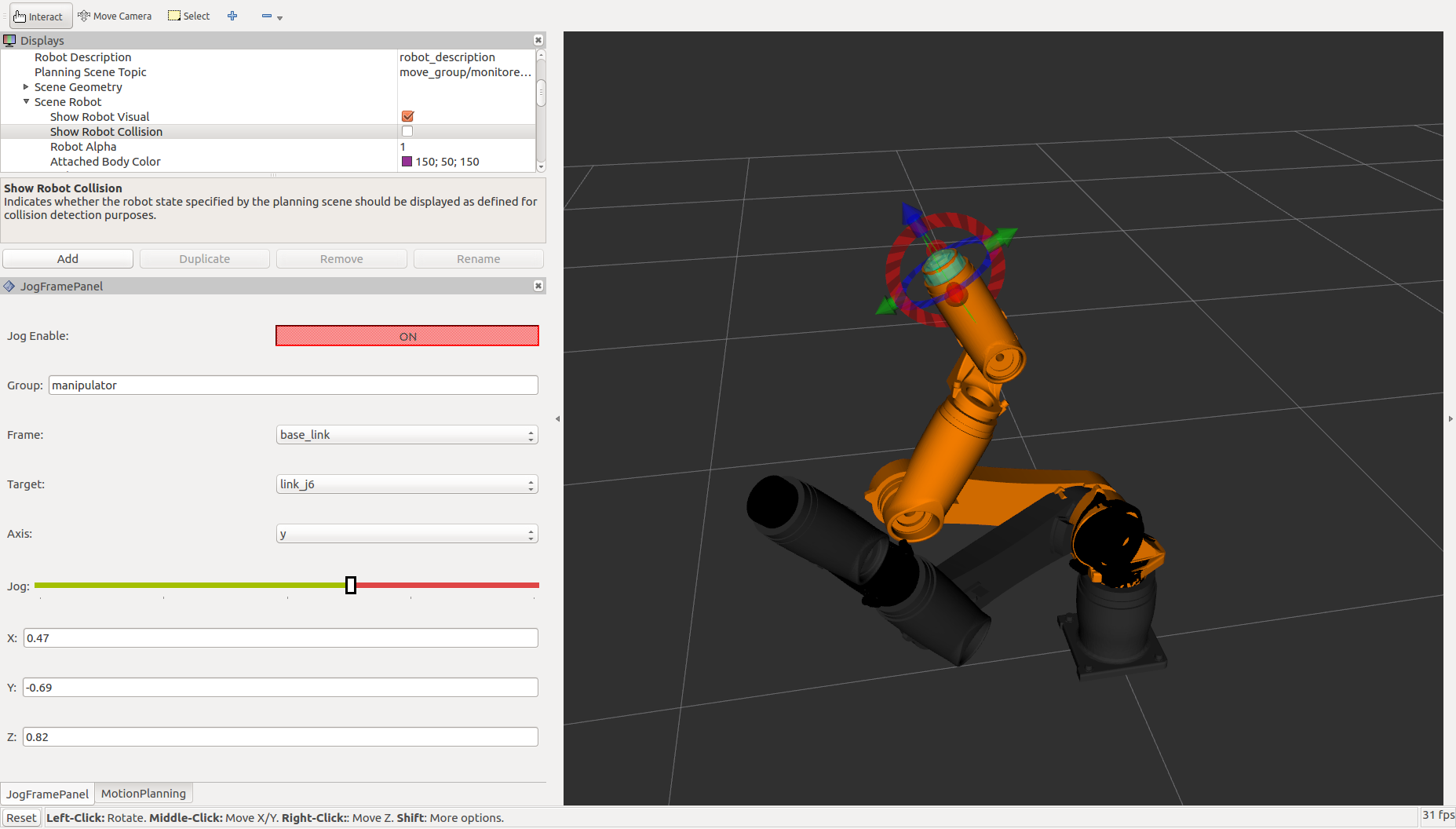
rviz jog control panel plugin
From rviz menu, you can choose "Panels" -> "Add New Panel". You can see JogJointPanel and JogFramePanel in the list. Choose it and push "OK" button, and you can add the panels on the left side of you rviz window.
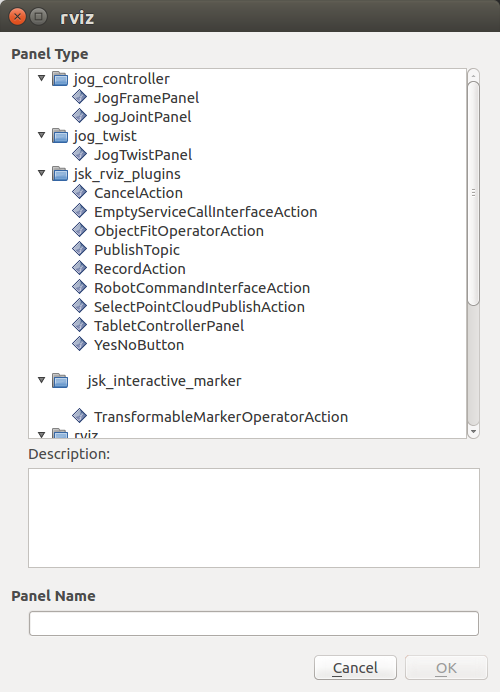
Please notice you can drag the panels to adjust the size and position in the rviz pane.
joypad
joypad.launch is the launch file to bringup joypad driver (joy node)
and the converter node (joy_to_jog_frame.py). This launch file have
following arguments.
-
joy_dev(default: /dev/input/js0)
The device file name of the joypad. Specify the defice file name of
your joypad here. You can check your device by ls /dev/input
command.
-
joy_config(default: xbox_wireless)
Configure file to setup button asignments. You can find an example
in config/xbox_wireless.config.yaml. Notice you need to modify the
config file to fit your joypad device.
-
group_name(default: manipulator)
This is the MoveIt! group name to jog. It need to be identical to the group name you want to use.
-
link_name(default: tool0)
This is the link_name to jog. You need to specify valid frame name in the group.
frame_id
Reference frame for frame jogging. You can specify valid frame name
such as base_link, tool0 and so on.
Please check your joypad is available by launching joypad.launch.
$ roslaunch jog_controller joypad.launch
If you got error like:
[ERROR] [1533283649.439653297]: Couldn't open joystick /dev/input/js0. Will retry every second.
then check the joypad connection and you can see device file in
/dev/input/. Please note some joypad need to be powered on. (XBox
wireless has a silver power button shaped round 'X' in front of the
joypad.)
If you have no error, please check if the jog_frame topic is published.
$ rostopic echo /jog_frame
You need to push 'Enable' button which is set by the enable_button
parameter in the config file. You can see message like:
header:
  seq: 751
  stamp:
    secs: 1531982605
    nsecs: 330952195
  frame_id: "base_link"
group_name: "manipulator"
link_name: "tool0"
linear_delta:
  x: 0.0
  y: -0.0
  z: -0.0
angular_delta:
  x: 0.0
  y: 0.0
  z: 0.0
avoid_collisions: True
and check your sticks produce desired message.
Could not convert RST to MD: No such file or directory - pandoc
Wiki Tutorials
Source Tutorials
Package Dependencies
| Deps | Name | |
|---|---|---|
| 2 | roslaunch | |
| 1 | catkin | |
| 2 | joy | |
| 1 | actionlib | |
| 1 | control_msgs | |
| 2 | jog_msgs | |
| 2 | moveit_core | |
| 2 | moveit_ros_planning | |
| 2 | moveit_visual_tools | |
| 1 | moveit_msgs | |
| 2 | roscpp | |
| 2 | rviz |
System Dependencies
Dependant Packages
| Name | Repo | Deps |
|---|---|---|
| jog_control | github-tork-a-jog_control | |
| jog_launch | github-tork-a-jog_control |
Launch files
- launch/joypad.launch
-
- joy_config [default: xbox_wireless]
- joy_dev [default: /dev/input/js0]
- group_name [default: manipulator]
- link_name [default: tool0]
- frame_id [default: base_link]