
|
fake_joint_driver package from fake_joint repofake_joint fake_joint_driver fake_joint_launch |
Package Summary
| Tags | No category tags. |
| Version | 0.0.3 |
| License | Apache License 2.0 |
| Build type | CATKIN |
| Use | RECOMMENDED |
Repository Summary
| Checkout URI | https://github.com/tork-a/fake_joint.git |
| VCS Type | git |
| VCS Version | master |
| Last Updated | 2018-08-30 |
| Dev Status | DEVELOPED |
| Released | RELEASED |
Package Description
Additional Links
Maintainers
- Tokyo Opensource Robotics Kyokai (TORK) Developer Team
Authors
- Ryosuke Tajima
fake_joint_driver
This package contains a node to provide
hardware_interface::PositionJointInterface, which simply loopback
the command joint position to the actual position. In other words, it
is faking a perfect joint controller. It can be used from
ros_controllers such as JointTrajectoryController. You can check your
own joint trajectories on rviz, without using Gazebo or others.
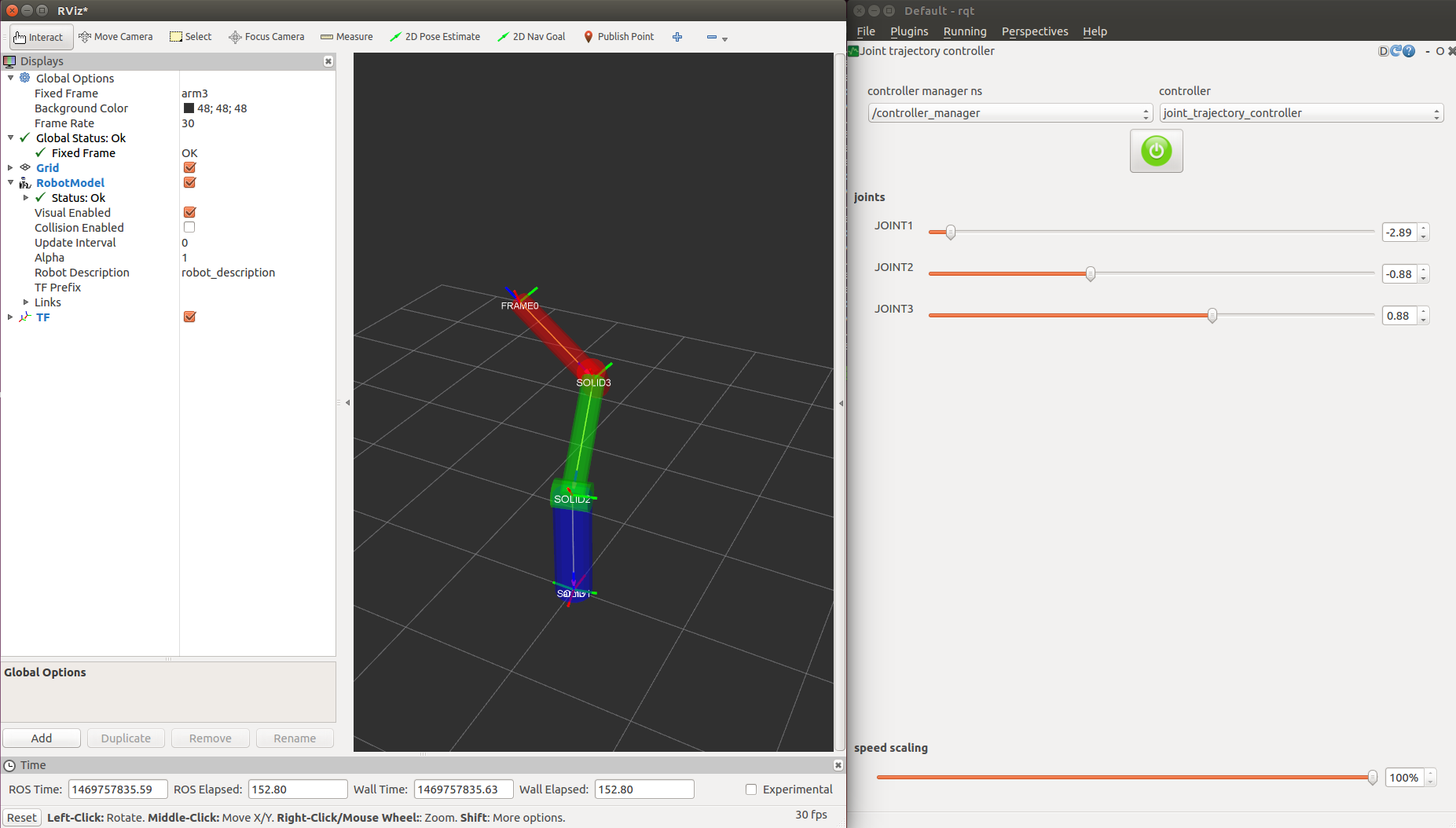
Quick start
launch the nodes
On one terminal, do:
$ roslaunch fake_joint_driver fake-joint-driver.test
This launch file does:
- Loading robot description of simple 3-DOF arm in robot/arm3.urdf.xacro
- Launching fake_joint_driver_node and robot_state_publisher
- Launching controller manager to spawn ros_controllers (joint_state_controller and joint_trajecotry_controller)
See the robot in rviz
On another terminal, do:
$ rviz
Add robot model to see the robot.
Set trajectory with rqt_joint_trajectory_controller
On another terminal, do:
$ rqt
Choose Plugins->Robot tools->Joint trajectory controller to load the plugin. Select controller manager and controller, then you can see sliders to set the joint trajectory goals.
Parameters
use_robot_description
When it is true, the driver read the parameter /robot_description
to obtain the joint list to control by this driver. When it is
false, you must specify the joint list by include_joints
parameters.
include_joints
This is the list of the joints which the driver node should control.
exclude_joints
This is the list of the joints which the driver node should not control.
start_position
This is a map to specify the initial position of the joint. You can use this to avoid collision in zero joint angle.
Use like:
  <!-- fake_joint_driver_node -->
  <node name="fake_joint_driver" pkg="fake_joint_driver" type="fake_joint_driver_node">
    <!-- Set joint start position -->
    <rosparam param="start_position">{LARM_JOINT2: -1.7, RARM_JOINT2: -1.7}</rosparam>
  </node>
Caution
You can set target joints for joint_trajectory_controller in the config/controllers.yaml. Note somehow you cannot see any controllers and joints in rqt_joint_trajectory_controller if any joints have no joint position limits in URDF file. It is easy to be trapped.
Could not convert RST to MD: No such file or directory - pandoc