No version for distro crystal. Known supported distros are highlighted in the buttons above.
No version for distro bouncy. Known supported distros are highlighted in the buttons above.
No version for distro melodic. Known supported distros are highlighted in the buttons above.
No version for distro lunar. Known supported distros are highlighted in the buttons above.

|
rwt_app_chooser package from visualization_rwt reporwt_app_chooser rwt_image_view rwt_moveit rwt_plot rwt_robot_monitor rwt_speech_recognition rwt_utils_3rdparty visualization_rwt |
Package Summary
| Tags | No category tags. |
| Version | 0.0.0 |
| License | MIT |
| Build type | CATKIN |
| Use | RECOMMENDED |
Repository Summary
| Checkout URI | https://github.com/tork-a/visualization_rwt.git |
| VCS Type | git |
| VCS Version | kinetic-devel |
| Last Updated | 2019-02-22 |
| Dev Status | DEVELOPED |
| Released | UNRELEASED |
Package Description
The simple web frontend for app_manager
Additional Links
No additional links.
Maintainers
- Yuki Furuta
Authors
- Yuki Furuta
rwt_app_chooser
App chooser client for web browsing device
Usage
- (On Robot) Launch app manager
    roscore &
    rosparam set robot/type pr2     # set robot type as rosparam
    rosparam set robot/name pr1012  # set robot name as rosparam
    roslaunch rwt_app_chooser app_manager.launch
You can use custom installed app list by:
roslaunch rwt_app_chooser app_manager.launch app_list:=/path/to/applist_dir
- (On Server) Launch rwt_app_chooser server
roslaunch rwt_app_chooser rwt_app_chooser.launch
This can be run on the robot
- You can now access to rwt_app_chooser page from http://localhost:8000/rwt_app_chooser/
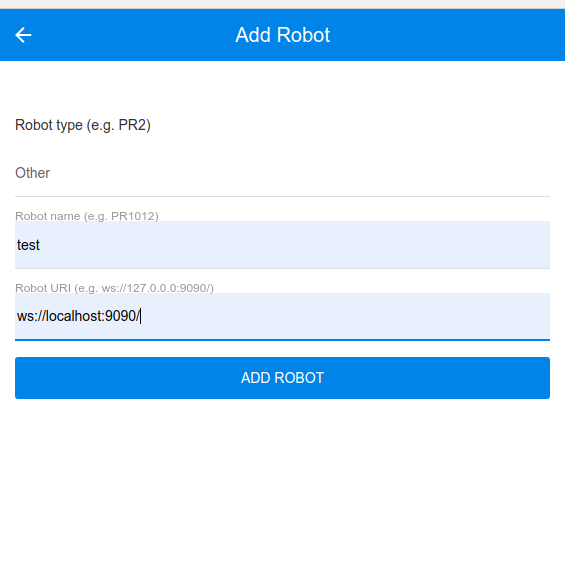
You will see following main page, then add "ADD ROBOT" button.
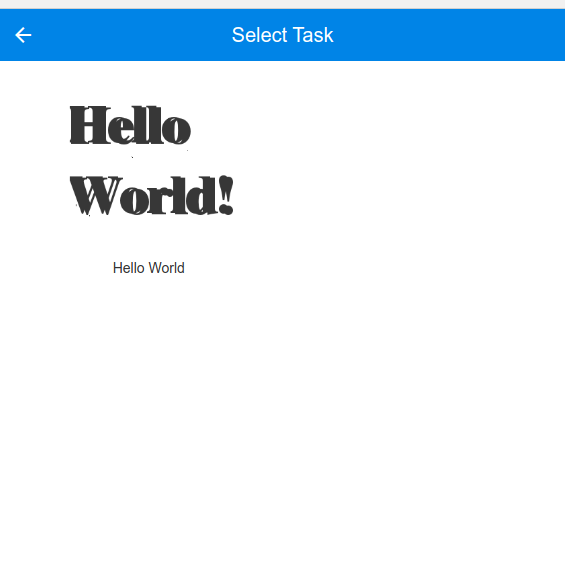
Then You will see following task launch page
Register Your App (Optional)
This section explains how to register your app to app chooser.
Prerequisities
- Your desired app name (e.g.
myapp) - Your own package (e.g.
mypkg) - Your own launch file (e.g.
myapp.launch) - Image for icon (e.g.
myapp.png)
Create an App
- First, locate your package, then create
appsdirectory
    roscd mypkg
    mkdir apps && cd apps
- Next, create a directory of your desired application and put launch / icon files there.
    mkdir myapp
    cp /path/to/myapp.launch myapp
    cp /path/to/myapp.png myapp
-
Then define the description of your app
There are two files that describe your app,
myapp.appandmyapp.interface.myapp.appdefines information and location to the files for app that are loaded byapp_manager. The content looks like below:
    display: My Application
    description: This is just my awesome application
    platform: pr2
    launch: mypkg/myapp.launch
    interface: mypkg/myapp.interface
    icon: mypkg/myapp.png
`myapp.interface` should look like below:
    published_topics:
      /processed/image: sensor_msgs/Image
    subscribed_topics:
      /camera/rgb/image_rect_color: sensor_msgs/Image
Congradurations! You just created your own app!
Now you have four files in the app directory:
    $ ls
    myapp.app myapp.interface myapp.launch myapp.png
-
Register created app to the manager
To call your app via app chooser, you need to add your app to the list. Edit
apps.installedfile in your applist directory and add your app.
    apps:
      - app: rwt_app_chooser/hello_world
        display: Hello World
    +  - app: mypkg/myapp
    +    display: My application of mypkg
Now you should find your app in app chooser. Enjoy! You can see a sample in sample/apps Directory.
Author
Yuki Furuta <furushchev@jsk.imi.i.u-tokyo.ac.jp>
CHANGELOG
No CHANGELOG found.
Wiki Tutorials
See ROS Wiki Tutorials for more details.
Source Tutorials
Not currently indexed.
Package Dependencies
| Deps | Name | |
|---|---|---|
| 1 | catkin | |
| 1 | app_manager | |
| 1 | rosbridge_server | |
| 1 | roswww | |
| 1 | sound_play | |
| 2 | rostest |
System Dependencies
Dependant Packages
| Name | Repo | Deps |
|---|---|---|
| visualization_rwt | github-tork-a-visualization_rwt |
Launch files
- launch/rwt_app_chooser.launch
-
- launch_roswww [default: true]
- port [default: 8000]
- launch/app_manager.launch
-
- app_list [default: $(find rwt_app_chooser)/sample/applist]
- port [default: 9090]
- sample/apps/hello_world/hello_world.launch
Messages
No message files found.
Services
No service files found
Plugins
No plugins found.
Recent questions tagged rwt_app_chooser at answers.ros.org
No version for distro indigo. Known supported distros are highlighted in the buttons above.
No version for distro ardent. Known supported distros are highlighted in the buttons above.
No version for distro jade. Known supported distros are highlighted in the buttons above.
No version for distro hydro. Known supported distros are highlighted in the buttons above.