
Package Summary
| Tags | No category tags. |
| Version | 0.0.4 |
| License | MIT |
| Build type | CATKIN |
| Use | RECOMMENDED |
Repository Summary
| Checkout URI | https://github.com/tue-robotics/image_recognition.git |
| VCS Type | git |
| VCS Version | master |
| Last Updated | 2019-04-06 |
| Dev Status | DEVELOPED |
| Released | RELEASED |
Package Description
Additional Links
Maintainers
- Rein Appeldoorn
Authors
image_recognition_openface
Face recognition with use of Openface (https://cmusatyalab.github.io/openface/)
Installation
See https://github.com/tue-robotics/image_recognition
Make sure that openface is correctly installed. Installation instructions can be found here: https://cmusatyalab.github.io/openface/setup/. Make sure you have installed CUDA8. CUDA10 is not working: https://github.com/torch/torch7/issues/1180
export TORCH_INSTALL_PATH=~/torch
export OPENFACE_INSTALL_PATH=~/openface
git clone https://github.com/torch/distro.git ~/torch --recursive && \
cd $TORCH_INSTALL_PATH && bash install-deps && ./install.sh && \
for NAME in dpnn nn optim optnet csvigo cutorch cunn fblualib torchx tds; do $TORCH_INSTALL_PATH/install/bin/luarocks install $NAME; done && \
sudo -H pip install dlib && \
git clone https://github.com/cmusatyalab/openface.git $OPENFACE_INSTALL_PATH && \
cd $OPENFACE_INSTALL_PATH && sudo -H python setup.py install && \
./models/get-models.sh
How-to
ROS Node
Run the image_recognition_openface node in one terminal (Specify the dlib and openface_net path as ROS parameter):
rosrun image_recognition_openface face_recognition_node
Run the rqt annotation client (https://github.com/tue-robotics/image_recognition_rqt)
rosrun image_recognition_rqt annotation_gui
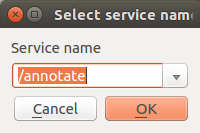
Setup the service by clicking the gear wheel in the top-right corner. Select the /annotate services exposed by the openface ros node. Also don't forget to set-up your labels.
Now draw a rectangle around the face you would like to learn. The face recognizer will find the biggest face in the image and store a representation for this face.
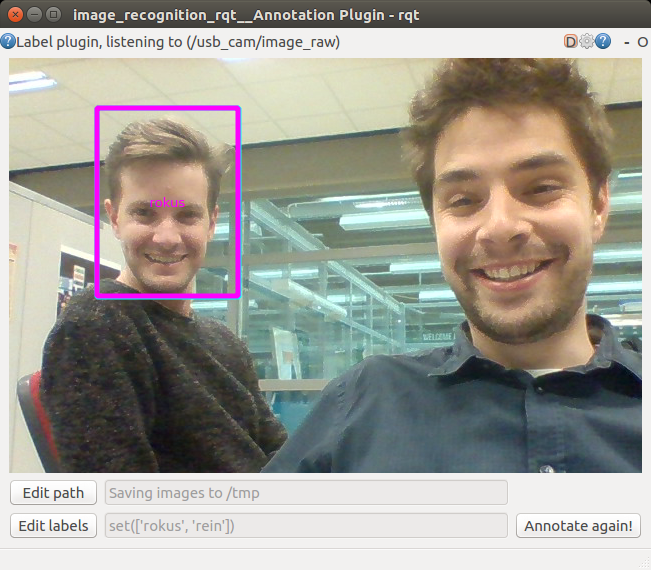
Now select the label and you will see that the openface ros node stores the face (console output node):
[INFO] [WallTime: 1478636380.407308] Succesfully learned face of 'rokus'
Learn as many faces as you want ..
Next step is starting the image_recognition_Rqt test gui (https://github.com/tue-robotics/image_recognition_rqt)
rosrun image_recognition_rqt test_gui
Again configure the service you want to call with the gear-wheel in the top-right corner of the screen. If everything is set-up, draw a rectangle in the image and ask the service for detections:
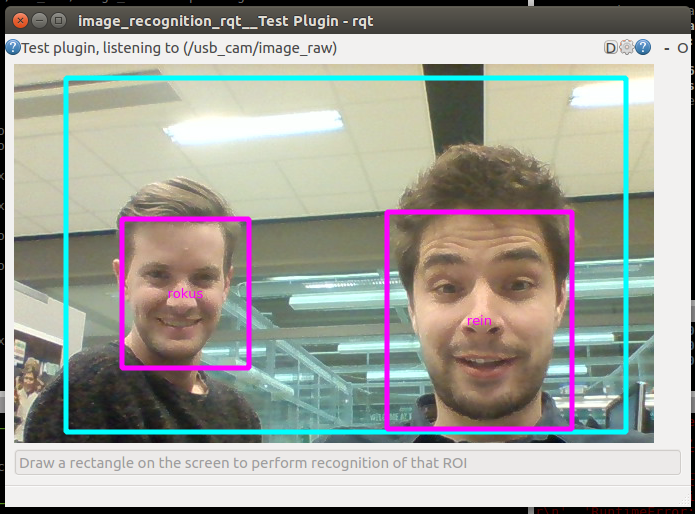
You will see that the result of the detection will prompt in a dialog combo box. Also the detections will be drawn on the image.
Command line
Command line interface to test the detection / recognition based on an image:
usage: get_face_recognition [-h] -i IMAGE [-k ALIGN_PATH] [-s NET_PATH] [-v]
Run the command on an example image:
rosrun image_recognition_openface get_face_recognition -i `rospack find image_recognition_openface`/doc/example.png
This will lookup this image in the image_recognition_openface/doc folder and perform recognitions
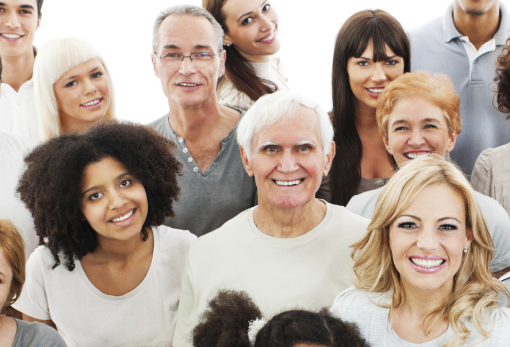
Output:
[RecognizedFace(roi=(374, 188, 108, 123), l2_distances=[]), RecognizedFace(roi=(72, 147, 88, 105), l2_distances=[]), RecognizedFace(roi=(377, 95, 74, 86), l2_distances=[]), RecognizedFace(roi=(149, 26, 74, 86), l2_distances=[]), RecognizedFace(roi=(52, 47, 75, 86), l2_distances=[]), RecognizedFace(roi=(246, 115, 88, 102), l2_distances=[]), RecognizedFace(roi=(0, 0, 42, 60), l2_distances=[]), RecognizedFace(roi=(336, 33, 74, 86), l2_distances=[]), RecognizedFace(roi=(228, 0, 62, 60), l2_distances=[])]
Since no faces were trained, the l2_distances will not be calculated of-course.
Could not convert RST to MD: No such file or directory - pandoc
Wiki Tutorials
Source Tutorials
Package Dependencies
| Deps | Name | |
|---|---|---|
| 1 | catkin | |
| 2 | cv_bridge | |
| 1 | image_recognition_msgs | |
| 1 | image_recognition_util | |
| 2 | rospy | |
| 1 | diagnostic_updater |
System Dependencies
Dependant Packages
| Name | Repo | Deps |
|---|---|---|
| image_recognition | github-tue-robotics-image_recognition |