No version for distro crystal. Known supported distros are highlighted in the buttons above.
No version for distro bouncy. Known supported distros are highlighted in the buttons above.
No version for distro melodic. Known supported distros are highlighted in the buttons above.
No version for distro lunar. Known supported distros are highlighted in the buttons above.

|
image_overlay_scale_and_compass package from image_overlay_scale_and_compass repoimage_overlay_scale_and_compass |
Package Summary
| Tags | No category tags. |
| Version | 0.2.1 |
| License | Unlicense |
| Build type | CATKIN |
| Use | RECOMMENDED |
Repository Summary
| Checkout URI | https://github.com/danielsnider/image_overlay_scale_and_compass.git |
| VCS Type | git |
| VCS Version | master |
| Last Updated | 2017-08-04 |
| Dev Status | MAINTAINED |
| Released | RELEASED |
Package Description
Add an indication of scale and compass to images and video streams.
Additional Links
Maintainers
- Daniel Snider
Authors
- Daniel Snider
image_overlay_scale_and_compass 
Add an indication of scale and compass to images.
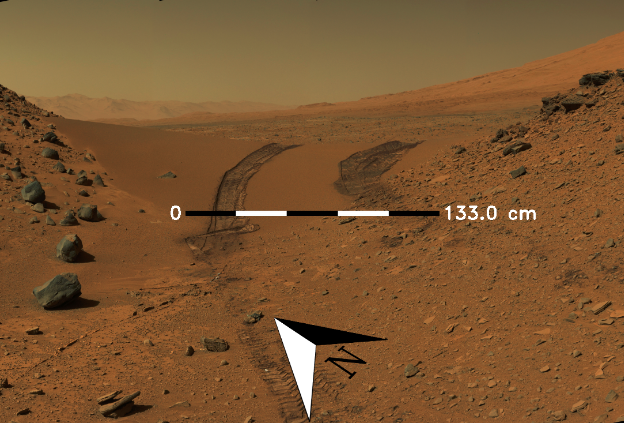
Full documentation on wiki: http://wiki.ros.org/image_overlay_scale_and_compass
Quick Start
- Install:
$ sudo apt-get install ros-kinetic-image-overlay-compass-and-scale
- Launch node:
$ roslaunch image_overlay_scale_and_compass overlay.launch
- Publish heading and scale values
$ rostopic pub /heading std_msgs/Float32 45
$ rostopic pub /scale std_msgs/Float32 133
- View resulting image
$ rqt_image_view /science/overlay/compressed
Command Line Interface (CLI)
Invoke once using Command Line Interface (CLI) and save to disk instead of pulishing to ROS.
$ roscd image_overlay_scale_and_compass
$ ./src/image_overlay_scale_and_compass/image_overlay.py --input-image ~/mars.png --heading 45 --scale-text 133 --output-file output.png
CLI Options
Usage: image_overlay.py [OPTIONS]

Options:
--input-image TEXT  Path to input image file  [required]
--heading FLOAT     Current heading relative to north in degrees  [required]
--scale-text FLOAT  The value to be displayed on the right of the scale bar
                    in centemeters  [required]
--output-file TEXT  Output filename to save result to
                    [default='output.png']
--help              Show this message and exit.
Full documentation on wiki: http://wiki.ros.org/image_overlay_scale_and_compass
CHANGELOG
Could not convert RST to MD: No such file or directory - pandoc
Wiki Tutorials
See ROS Wiki Tutorials for more details.
Source Tutorials
Not currently indexed.
Package Dependencies
System Dependencies
Dependant Packages
No known dependants.
Launch files
Messages
No message files found.
Services
No service files found
Plugins
No plugins found.
Recent questions tagged image_overlay_scale_and_compass at answers.ros.org
No version for distro indigo. Known supported distros are highlighted in the buttons above.
No version for distro ardent. Known supported distros are highlighted in the buttons above.
No version for distro jade. Known supported distros are highlighted in the buttons above.
No version for distro hydro. Known supported distros are highlighted in the buttons above.