
|
fmi_adapter_examples package from fmi_adapter_ros2 repofmi_adapter fmi_adapter_examples |
Package Summary
| Tags | No category tags. |
| Version | 0.1.4 |
| License | Apache License 2.0 |
| Build type | AMENT_CMAKE |
| Use | RECOMMENDED |
Repository Summary
| Checkout URI | https://github.com/boschresearch/fmi_adapter_ros2.git |
| VCS Type | git |
| VCS Version | crystal |
| Last Updated | 2019-05-23 |
| Dev Status | DEVELOPED |
| Released | RELEASED |
Package Description
Additional Links
Maintainers
- Ralph Lange
Authors
General information about this repository, including legal information, build instructions and known issues/limitations, are given in README.md in the repository root.
The fmi_adapter_examples package
This ROS 2 package provides few examples for the use of the fmi_adapter package. It contains two FMU files DampedPendulum.fmu and TransportDelay.fmu (both created with the FMU SDK) and corresponding launch files. Furthermore, it includes a model of a damped pendulum in the Modelica language to create your own FMU.
Running the provided sample FMUs
Use ros2 launch fmi_adapter_examples simple_damped_pendulum.launch.py to simulate a damped pendulum (share/DampedPendulum.fmu) with a length of 1m. The pendulum's angle is published at topic /a with the default rate of 100Hz. The step size of the FMU's solver is 1ms.
To print the angle data on another console, invoke ros2 topic echo /a.
damped_pendulum_with_transport_delay.launch.py starts two nodes named /example/damped_pendulum and /example/transport_delay. The first one simulates share/DampedPendulum.fmu, where the length parameter is set to 25m by the launch file. The second node runs share/TransportDelay.fmu, where the delay parameter is set to 2.33s. The input subscription of the transport delay is remapped to the pendulum's angle topic and the delayed angle is published at /example/y.
Create and simulate your own DampedPendulum.fmu
There are several modeling tools that support the Modelica language and provide FMU export. Examples are Dymola, JModelica, and OpenModelica.
In the following, we explain the process by the example of OpenModelica, which has been also used to create the model of the damped pendulum at share/DampedPendulum.mo.
- Download and install OpenModelica for Linux as described in https://openmodelica.org/download/download-linux.
- Launch
OMEditand load the share/DampedPendulum.mo model file. - Click on the DampedPendulum model in the project tree on the left.

- Navigate to Tools -> Options -> FMI and ensure that
Version=2.0,Type=Co-SimulationandPlatforms=Dynamicis selected. - Then click FMI -> Export FMU.
- The path of the resulting FMU file is shown in the message browser at the bottom of the window, typically
/tmp/OpenModelica_[user]/OMEdit/DampedPendulum.fmu.
Now, you are prepared for simulating the FMU using the fmi_adapter package.
Use the generic launch file of the package
ros2 launch fmi_adapter fmi_adapter_node.launch.py fmu_path:=/tmp/OpenModelica_[user]/OMEdit/DampedPendulum.fmuYou may print the pendulum's angle to the console by
ros2 topic echo /revolute1_angle
Please see the README.md of the fmi_adapter package for how to load and run an FMU inside an application-specific ROS node or library.
Note on bug with mmc_mk_modelica_array in OpenModelica 1.12.0: If fmi_adapter crashes with the error message undefined symbol: mmc_mk_modelica_array, please patch the files
- /usr/include/omc/c/meta/meta_modelica.h
- /usr/include/omc/c/meta/meta_modelica_data.h
according to https://github.com/OpenModelica/OMCompiler/pull/2397/files and export the FMU again. Details on this bug are given in https://trac.openmodelica.org/OpenModelica/ticket/4899.
Could not convert RST to MD: No such file or directory - pandoc
Wiki Tutorials
Source Tutorials
Package Dependencies
| Deps | Name | |
|---|---|---|
| 2 | fmi_adapter | |
| 1 | ament_cmake | |
| 1 | launch | |
| 1 | launch_ros |
System Dependencies
Dependant Packages
Launch files
Messages
Services
Plugins
Recent questions tagged fmi_adapter_examples at answers.ros.org
|
|
fmi_adapter_examples package from fmi_adapter repofmi_adapter fmi_adapter_examples |
Package Summary
| Tags | No category tags. |
| Version | 1.0.2 |
| License | Apache License 2.0 |
| Build type | CATKIN |
| Use | RECOMMENDED |
Repository Summary
| Checkout URI | https://github.com/boschresearch/fmi_adapter.git |
| VCS Type | git |
| VCS Version | master |
| Last Updated | 2019-04-26 |
| Dev Status | MAINTAINED |
| Released | RELEASED |
Package Description
Additional Links
Maintainers
- Ralph Lange
Authors
- Ralph Lange
General information about this repository, including legal information, build instructions and known issues/limitations, are given in README.md in the repository root.
The fmi_adapter_examples package
This ROS package provides few examples for the use of the fmi_adapter package. It contains two FMU files DampedPendulum.fmu and TransportDelay.fmu (both created with the FMU SDK) and corresponding launch files. Furthermore, it includes a model of a damped pendulum in the Modelica language to create your own FMU.
Running the provided sample FMUs
Use roslaunch fmi_adapter_examples simple_damped_pendulum.launch to simulate a damped pendulum (share/DampedPendulum.fmu) with a length of 1m. The pendulum's angle is published at /fmi_adapter_node/a with the default rate of 100Hz. The step size of the FMU's solver is 1ms.
damped_pendulum_with_transport_delay.launch starts two nodes. The first one simulates share/DampedPendulum.fmu, where the length parameter is set to 25m by the launch file. The second node runs share/TransportDelay.fmu, where the delay parameter is set to 2.33s. The input subscription of the transport delay is remapped to the pendulum's angle topic and the delayed angle is published at /transport_delay/y.
Both launch files also open rqt_plot to visualize the angle(s).

Create and simulate your own DampedPendulum.fmu
There are several modeling tools that support the Modelica language and provide FMU export. Examples are Dymola, JModelica, and OpenModelica.
In the following, we explain the process by the example of OpenModelica, which has been also used to create the model of the damped pendulum at share/DampedPendulum.mo.
- Download and install OpenModelica for Linux as described in https://openmodelica.org/download/download-linux.
- Launch
OMEditand load the share/DampedPendulum.mo model file. - Click on the DampedPendulum model in the project tree on the left.
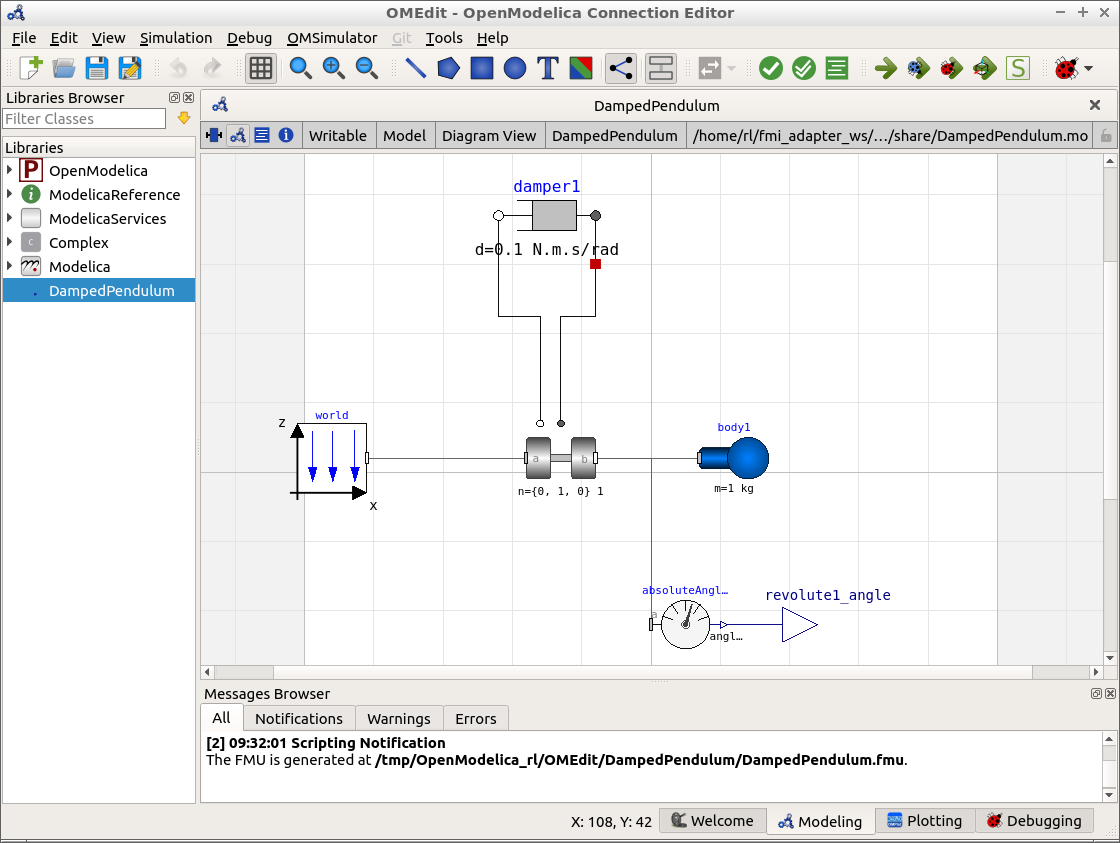
- Navigate to Tools -> Options -> FMI and ensure that
Version=2.0,Type=Co-SimulationandPlatforms=Dynamicis selected. - Then click FMI -> Export FMU.
- The path of the resulting FMU file is shown in the message browser at the bottom of the window, typically
/tmp/OpenModelica_[user]/OMEdit/DampedPendulum.fmu.
Now, you are prepared for simulating the FMU using the fmi_adapter package.
Either use the generic launch file of the package
roslaunch fmi_adapter fmi_adapter_node.launch fmu_path:=/tmp/OpenModelica_[user]/OMEdit/DampedPendulum.fmuor invoke the package's node directly byrosrun fmi_adapter node _fmu_path:=/tmp/OpenModelica_[user]/OMEdit/DampedPendulum.fmuYou may visualize the pendulum's angle over time by
rqt_plot /fmi_adapter_node/revolute1_angle

Please see the README.md of the fmi_adapter package for how to load and run an FMU inside an application-specific ROS node or library.
Note on bug with mmc_mk_modelica_array in OpenModelica 1.12.0: If the fmi_adapter node crashes with the error message undefined symbol: mmc_mk_modelica_array, please patch the files
- /usr/include/omc/c/meta/meta_modelica.h
- /usr/include/omc/c/meta/meta_modelica_data.h
according to https://github.com/OpenModelica/OMCompiler/pull/2397/files and export the FMU again. Details on this bug are given in https://trac.openmodelica.org/OpenModelica/ticket/4899.
Could not convert RST to MD: No such file or directory - pandoc